 Development
What Is the Difference Between UI and UX? A Complete i2d Guide
When browsing websites or using mobile apps, you’ve likely encountered the terms UI and UX. These buzzwords appear everywhere in the digital world, yet many...
Read More

Payment Gateway Integration Payment gateway integration is the process of connecting a website or online store to a secure payment service that processes customer transactions....

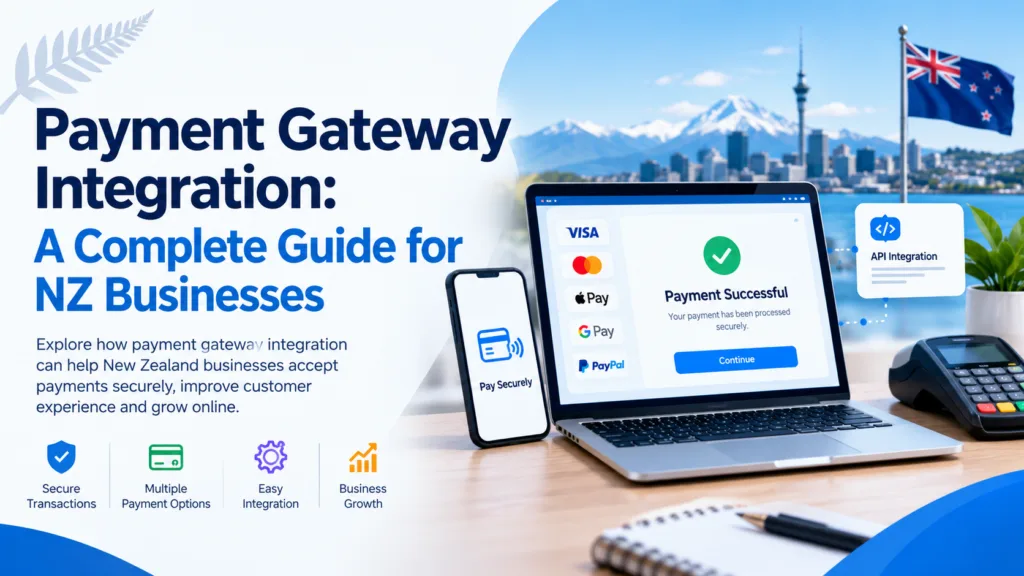
Payment gateway integration is the process of connecting a website or online store to a secure payment service that processes customer transactions. It allows businesses to accept payments through credit cards, debit cards, digital wallets, and other supported payment methods. A well-integrated payment gateway protects sensitive payment information, simplifies checkout, reduces payment friction, and helps businesses manage online sales efficiently. For New Zealand businesses, choosing the right gateway means considering transaction fees, security standards, local payment preferences, and compatibility with their website platform.
Online shopping has transformed the way New Zealanders purchase products and services. From small local retailers to growing eCommerce brands, businesses increasingly rely on websites to reach customers, accept orders, and generate revenue. However, attracting visitors to a website is only one part of running a successful online business. Customers also need a convenient, reliable, and secure way to pay.
This is where payment gateway integration becomes essential.
A payment gateway connects your website to a payment processing service, enabling customers to complete transactions without unnecessary complications. When implemented correctly, it creates a smoother checkout experience, builds customer confidence, and helps businesses handle payments more efficiently.
Whether you operate an online shop, sell digital products, provide professional services, or manage a subscription-based business, understanding how payment gateway integration works can help you make better decisions about your website and payment infrastructure.
In this guide, we explore the payment gateway integration process, its benefits, available payment options, security considerations, common challenges, and practical steps New Zealand businesses can follow to create a dependable online payment experience.
Payment gateway integration involves connecting a website, mobile application, or eCommerce platform to a third-party payment service that securely facilitates electronic transactions.
When a customer purchases a product online, the payment gateway helps transmit payment information securely between the customer, the merchant, and the relevant payment processing network. Depending on the provider and payment method, the transaction may involve the customer’s bank, the merchant’s payment processor, and the card network.
The gateway helps authorise the payment and communicates whether the transaction has been approved or declined.
For example, imagine a New Zealand customer purchasing clothing from an online store. They add their preferred items to the cart, enter their delivery details, and select a payment method. Once they submit the payment, the integrated gateway securely handles the payment process and returns a transaction result to the website.
If the payment is approved, the store can confirm the order and begin fulfilment.
A properly configured integration can also support refunds, payment status updates, transaction records, and automated order processing, depending on the gateway’s features.
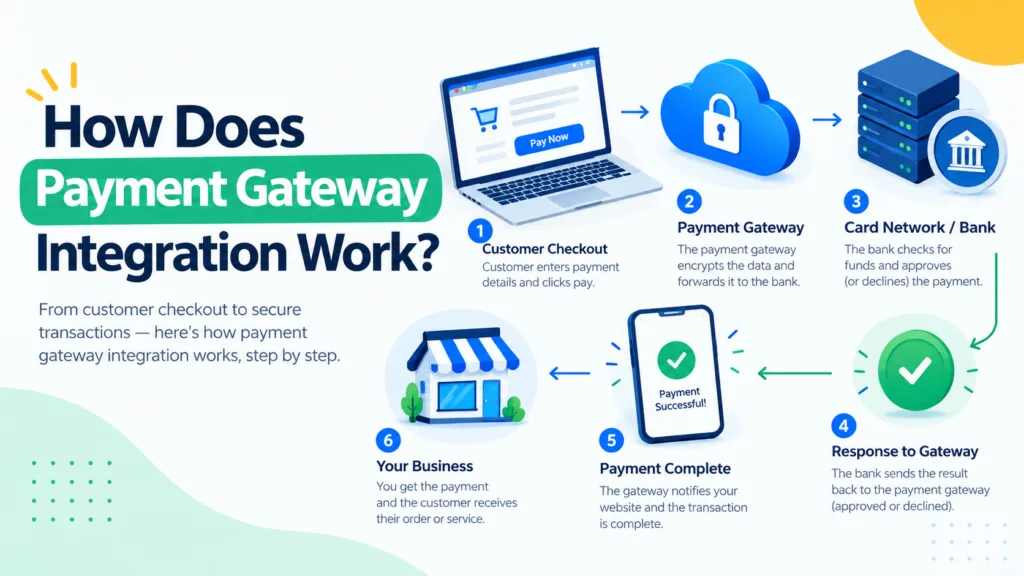
Understanding the payment process helps business owners identify what happens behind the scenes when a customer makes an online purchase.
The process begins when a customer selects products or services and proceeds to checkout. They review their order, enter the required information, and choose an available payment method.
A clear checkout page should display the order total, applicable taxes, shipping costs, and any other charges before the customer confirms the purchase.
After the customer submits their payment, the website or checkout system initiates a transaction through the payment gateway.
Depending on the integration method, the customer may be redirected to a secure hosted payment page, use an embedded payment form, or complete the transaction through supported payment components.
Using a gateway-hosted checkout can reduce the amount of sensitive payment information handled directly by the merchant’s website.
The gateway securely transmits the necessary payment information to the relevant payment processing infrastructure. The payment provider works with the appropriate financial institutions and networks to request authorisation.
Security controls, fraud checks, authentication requirements, and provider-specific rules may also apply during this stage.
The payment provider returns a transaction status. An approved transaction allows the website to proceed with the order, while a declined transaction should prompt the customer to try another supported payment method or check their details.
The website must handle both outcomes properly to avoid confusion or incorrect order confirmations.
Once the transaction has been verified, the website can update the order status, display a confirmation message, and send an email receipt if configured.
Reliable integrations also use server-side notifications, such as verified webhooks, to keep order records synchronised with the payment provider. This is particularly important when payment confirmation arrives after the customer leaves the checkout page.
Authorisation does not always mean the money has already reached the business’s bank account. Depending on the provider, payment method, and transaction settings, funds may need to be captured and then settled to the merchant according to the provider’s schedule.
Understanding this distinction helps businesses manage cash flow and reconcile their sales accurately.
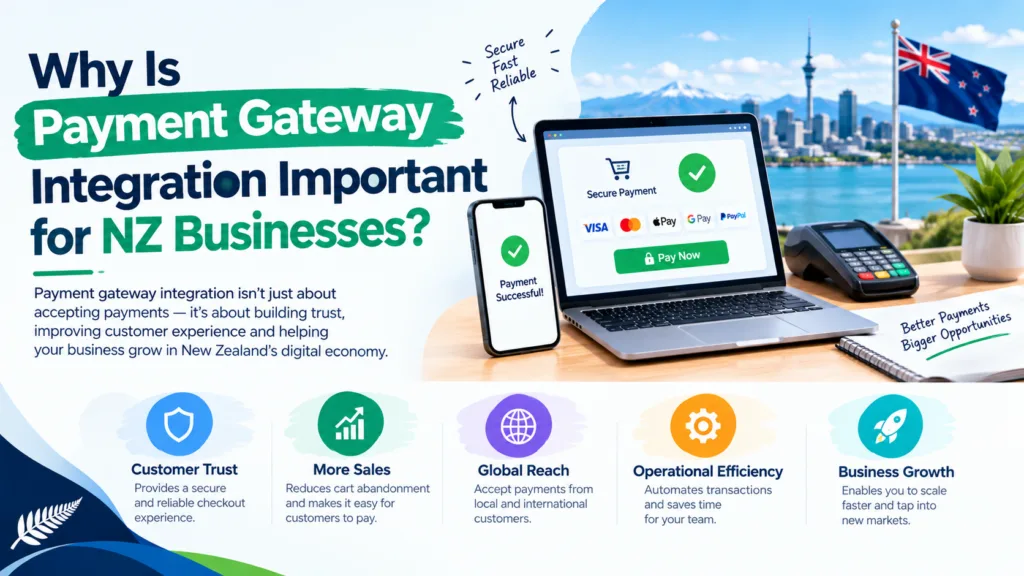
Payment gateway integration is more than a technical feature. It directly influences how customers interact with a business and how efficiently the business manages its online operations.
Customers expect a straightforward checkout process. A well-integrated gateway allows them to pay online without needing to arrange a bank transfer or contact the business manually.
Offering familiar payment methods can make purchasing easier for both new and returning customers.
People want reassurance that their payment information is being handled responsibly. A recognised payment provider, secure checkout, clear business details, and transparent pricing can help customers feel more comfortable completing a purchase.
Businesses should also display relevant privacy information, refund policies, and terms of sale.
Automated payment confirmation can reduce manual administration. Instead of checking bank deposits and confirming every order individually, staff can use integrated payment and order management tools to process transactions more efficiently.
As a business expands, manual payment handling becomes harder to manage. An integrated gateway can support increasing order volumes, additional payment methods, and new sales channels, subject to the provider’s capabilities and account limits.
Payment dashboards and reporting tools help business owners review successful transactions, failed payments, refunds, and other activity. When combined with accurate accounting records, these insights make financial administration easier.
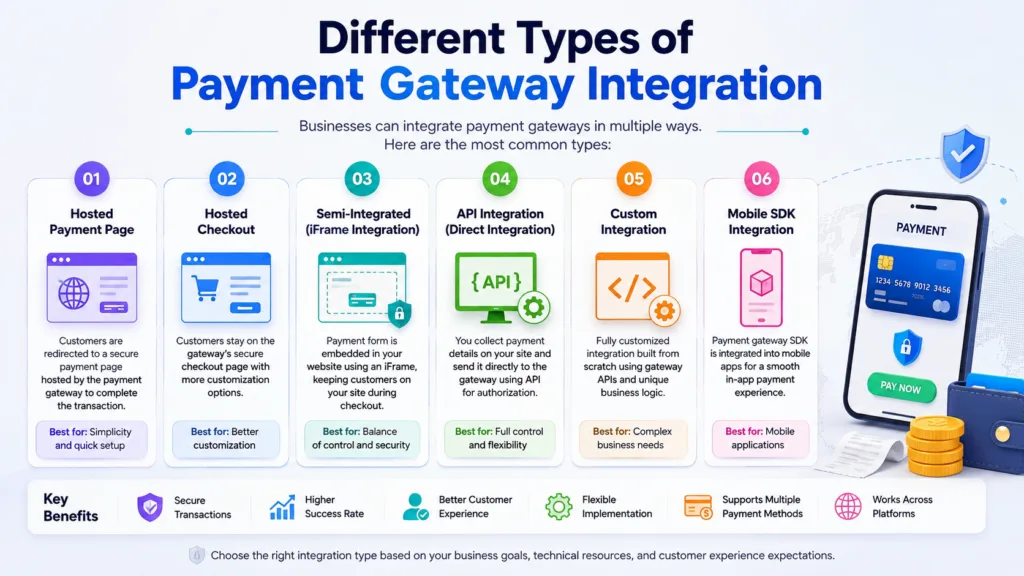
Not every business needs the same payment setup. The most suitable approach depends on the website platform, available technical resources, security requirements, and desired customer experience.
A hosted gateway redirects customers to a secure payment page managed by the provider. After the payment is completed, the customer is returned to the merchant’s website.
This approach is often suitable for small and medium-sized businesses that want to introduce online payments without building a complete payment interface themselves.
Main advantages:
However, businesses should maintain a consistent checkout journey and ensure customers understand when they are moving to a payment provider’s page.
An embedded gateway allows payment fields or payment components to appear within the merchant’s website. Customers can complete their transactions without necessarily leaving the checkout page.
This can provide a more consistent shopping experience, although implementation complexity and security responsibilities depend on how the integration is built.
Developers should use the provider’s approved components rather than creating insecure custom methods for collecting card details.
API-based integration provides greater flexibility for businesses that require custom payment workflows. Developers can connect payment functionality with tailored websites, booking platforms, subscription systems, or internal business applications.
This approach may support specialised requirements such as recurring payments, saved payment methods, refunds, or complex order management.
However, it requires careful development, testing, error handling, and ongoing maintenance. The business must also understand its security and compliance responsibilities.
Many online store platforms offer payment gateway extensions or built-in payment integrations. These can simplify setup because the payment functionality is designed to work with the platform’s checkout and order management system.
Before selecting a plugin or extension, check that it is supported, regularly maintained, compatible with your platform version, and suitable for your country and business model.
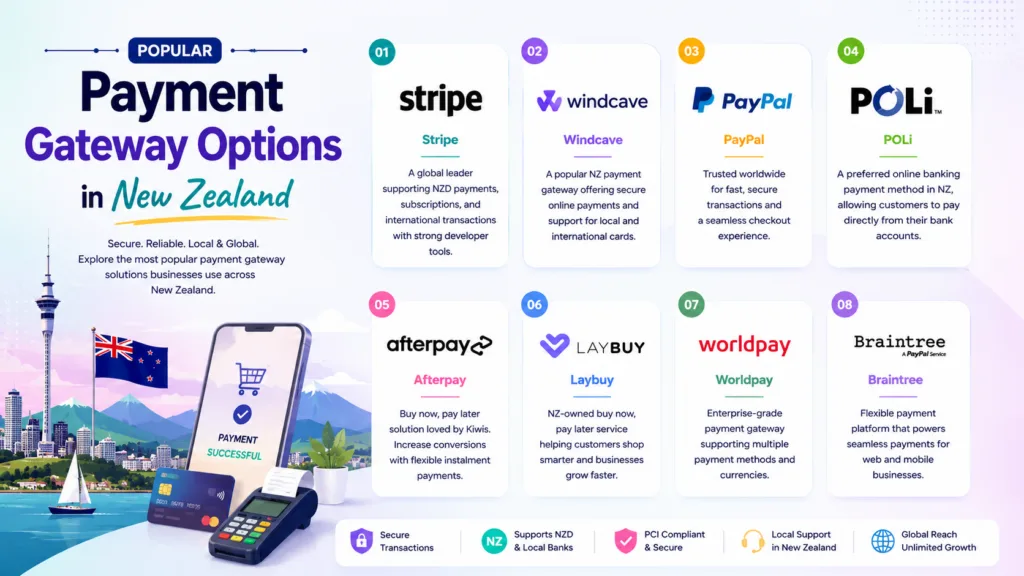
New Zealand businesses have several payment providers to consider. The best option depends on transaction costs, supported payment methods, integration requirements, settlement arrangements, and customer preferences.
Stripe provides online payment processing and developer tools for websites and applications. It can be suitable for eCommerce stores, service businesses, and subscription-based platforms that need flexible payment functionality.
Businesses can explore its supported payment methods, pricing, and integration options through the official Stripe New Zealand website.
PayPal allows customers to pay using supported PayPal services and, depending on the checkout setup, other available payment options.
It may be useful for businesses selling internationally or serving customers who prefer using an established digital wallet. Before integrating it, review the applicable New Zealand fees, account requirements, and supported features.
Visit the official PayPal New Zealand website for current information.
Windcave offers payment technology for businesses, including online payment capabilities. It may be worth considering for merchants looking for payment solutions that support their particular business operations and local requirements.
Explore available products and integration documentation on the official Windcave website.
Businesses operating on Shopify can investigate Shopify Payments where it is available and the business meets the relevant eligibility requirements.
Using a platform-integrated option can simplify checkout configuration and order management. However, merchants should check supported payment methods, fees, payout schedules, and eligibility before making a decision.
Read more on the official Shopify Payments page.
Important: Provider availability, supported payment methods, eligibility, and fees can change. Compare current terms before choosing a solution rather than selecting a gateway based on popularity alone.
A payment gateway is only useful if it offers payment methods that suit your customers. New Zealand businesses should consider their audience, average order value, product type, and whether they sell locally or internationally.
Common options include:
Offering more methods is not always better. Too many choices can complicate checkout, increase administration, or introduce unnecessary fees. Start with the options your target customers are most likely to use and expand when there is a clear business reason.
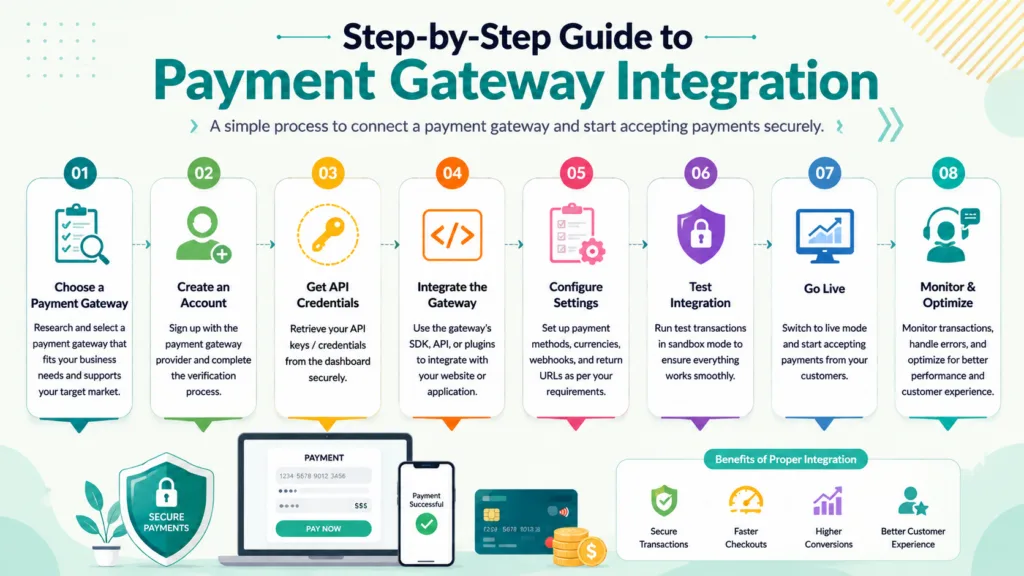
Implementing a payment gateway requires planning, technical configuration, and careful testing. Following a structured process helps prevent common problems after launch.
Start by deciding what the payment system needs to do. A basic online store may only need one-off payments, while a subscription platform may require recurring billing, automated renewals, and cancellation management.
Consider these questions:
Clear requirements make it easier to compare providers and estimate development costs.
Compare the available providers against your requirements. Look beyond the advertised transaction rate and investigate other charges, such as international card fees, currency conversion, refunds, disputes, and monthly service costs.
Also review the provider’s documentation, customer support, fraud prevention tools, settlement policies, and integration options.
Your website should have a functional checkout, clear product or service descriptions, accurate pricing, and accessible contact information.
Depending on your business model, you may also need privacy, shipping, refund, cancellation, and terms-of-service pages. These should reflect your actual business practices and applicable New Zealand requirements.
A well-planned website structure and user-friendly interface make the payment process easier to understand. For example, businesses investing in Website Design NZ should ensure that the checkout experience works consistently across mobile phones, tablets, and desktop computers.
Create and configure your merchant account, complete any required verification, and obtain the necessary integration credentials.
Most providers offer a test environment, often called a sandbox, where developers can simulate transactions without processing real customer payments.
Keep secret API keys on the server, store credentials securely, and use separate test and live configurations. Never place private credentials in public JavaScript code or commit them to a public source-code repository.
The implementation method depends on your platform.
For a supported eCommerce platform, you may be able to install and configure an official extension. A custom website may require a developer to use the provider’s APIs, software development kit, hosted checkout, or approved payment components.
The integration should correctly handle transaction creation, payment confirmation, failed payments, refunds, and any other required operations.
Testing should cover more than a successful transaction. Check how the website responds when payments fail, customers cancel checkout, a browser is refreshed, or a provider notification arrives more than once.
Important tests include:
Use the provider’s test cards and sandbox procedures rather than real customer payment details.
Once testing is complete, switch to the live configuration and complete a controlled production test where appropriate. Confirm that real payments are processed correctly and that orders, receipts, and payment records are updated as expected.
Monitor failed transactions, unusual payment activity, customer feedback, and settlement records during the initial launch period. Address any issues promptly.
Security is one of the most important aspects of online payment integration. A poorly configured payment system can expose customers to unnecessary risks and create operational or financial consequences for a business.
Your website should use HTTPS with a valid TLS certificate. This protects data transmitted between the customer’s browser and the website, although HTTPS alone does not guarantee that the entire payment system is secure.
API credentials should be restricted to the appropriate environments and permissions. Rotate exposed credentials promptly and avoid placing sensitive information in logs or error messages.
The Payment Card Industry Data Security Standard (PCI DSS) establishes security requirements for environments that store, process, or transmit payment card data.
Using a hosted payment page or approved provider components may reduce the merchant’s exposure to card data and simplify certain compliance requirements. However, it does not automatically remove every PCI DSS obligation.
Businesses should confirm their responsibilities with their payment provider or a qualified security professional.
Read the official PCI Security Standards Council website for information about the standard and its requirements.
Fraud prevention tools can help identify suspicious transactions. Depending on the provider, these may include risk scoring, transaction monitoring, authentication, and configurable fraud rules.
Businesses should balance fraud prevention with customer convenience. Overly restrictive rules can reject legitimate purchases, while weak controls can increase losses.
A website should not mark an order as paid simply because a customer reaches a success page. The customer could close the browser, revisit an old URL, or manipulate information sent from the client side.
Instead, verify the transaction with the provider or validate authenticated webhook notifications. Implement appropriate checks for event authenticity, transaction amount, currency, order reference, and payment status.
Use idempotency controls where supported so that repeated requests or notifications do not create duplicate charges or duplicate order processing.
Collect only the customer information needed to complete the transaction and fulfil the order. Follow applicable privacy requirements, explain how information is used, and review the provider’s data-handling arrangements.
For New Zealand businesses, the Office of the Privacy Commissioner provides guidance on privacy obligations and responsible handling of personal information.
Even a reliable payment provider can encounter issues when its integration is poorly configured. Understanding common challenges helps businesses prepare for them.
Transactions may fail because of insufficient funds, incorrect details, bank restrictions, authentication problems, or provider outages.
Display a helpful message without exposing sensitive technical details. Where appropriate, let customers retry the transaction or choose another payment method.
A provider’s headline rate may not represent the full cost of accepting payments. International cards, currency conversion, disputes, and other services may incur additional charges.
Review the complete fee schedule and calculate the likely cost based on your expected sales volume and customer mix.
Sometimes the payment succeeds but the website fails to update the order correctly. Other times, the customer returns to the website before the payment has been fully confirmed.
Reliable server-side payment verification, appropriate retry handling, and clear order states help prevent these problems.
Unnecessary fields, unexpected redirects, unclear delivery costs, and poor mobile usability can discourage customers from completing purchases.
Keep the process focused on essential information and make the final price visible before payment.
A plugin or payment extension may conflict with another website feature or become incompatible after an update.
Choose supported integrations, test changes in a staging environment, and maintain a process for reviewing updates before applying them to the live website.
A successful payment integration should do more than process transactions. It should make it easier for interested customers to become paying customers.
First, reduce unnecessary checkout steps. Customers should not have to enter the same information multiple times or navigate through confusing pages.
Second, make pricing transparent. Display delivery costs, taxes, recurring charges, and other applicable fees before the customer confirms payment.
Third, offer relevant payment methods. If customers cannot use their preferred option, they may abandon the checkout.
Fourth, improve mobile usability. Buttons should be easy to tap, text should be readable, and forms should work correctly on smaller screens.
Finally, track checkout performance. Analyse payment success rates, abandonment, and errors to identify where customers experience difficulty. Any tracking involving personal information should be configured responsibly and in accordance with applicable privacy requirements.
For businesses working on web design auckland, these checkout improvements can complement wider website usability and conversion optimisation efforts.
The cost of payment gateway integration varies according to the provider, website platform, and complexity of the required functionality. Some businesses can activate an existing payment plugin with minimal setup, while others need custom development and testing.
The main costs to consider include:
For example, a small retailer using an existing eCommerce integration may have relatively low implementation costs. A larger business requiring a custom booking system, recurring billing, accounting software integration, and multiple currencies will generally need more development work.
The best approach is to calculate the total cost of ownership rather than comparing providers on transaction fees alone.
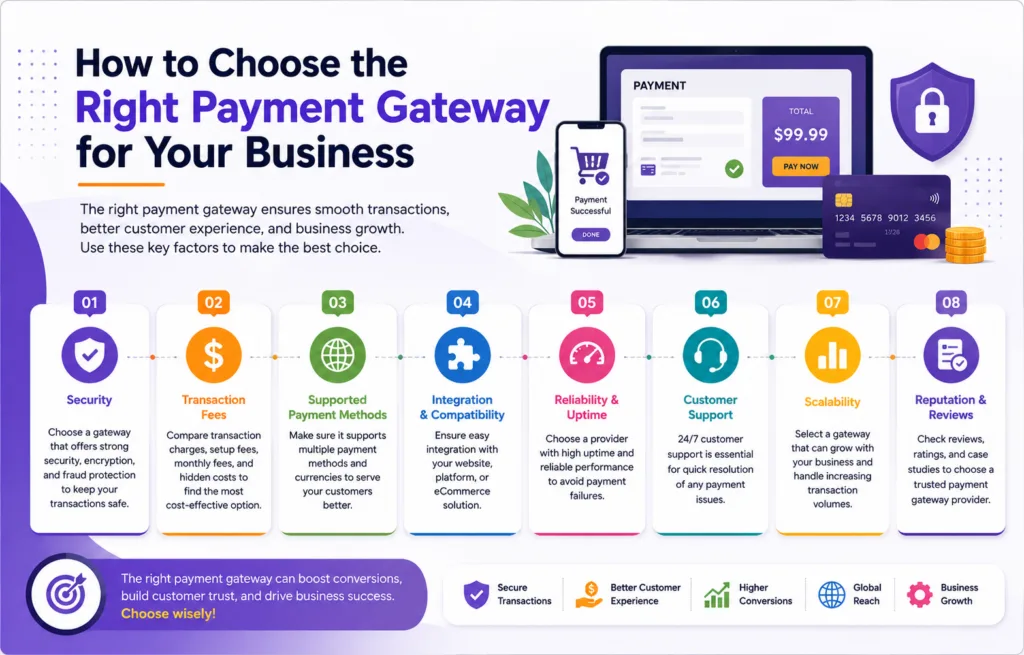
Choosing a suitable gateway requires balancing customer convenience, security, cost, and technical requirements.
Use the following considerations when comparing options.
| Factor | What to check |
| Payment methods | Cards, digital wallets, and other options your customers need |
| Transaction fees | Domestic and international payment charges |
| Website compatibility | Support for your website platform and existing plugins |
| Security | Fraud controls, authentication, and PCI DSS responsibilities |
| Settlement | Payout timing and supported settlement currencies |
| Customer support | Availability of technical help and documentation |
| Scalability | Support for growing transaction volumes and new markets |
| Reporting | Transaction exports, refunds, and reconciliation tools |
It is also worth considering the quality of the provider’s developer documentation. Clear documentation and reliable support can make integration easier and reduce the time required to resolve technical issues.
Before committing, test the checkout experience and confirm that the provider supports your business model. A gateway designed for straightforward retail purchases may not be the best fit for a business with recurring payments or complex booking requirements.
Payment gateway integration is not a one-time task that can be forgotten after launch. Payment providers update their APIs, website platforms release new versions, and security requirements evolve.
Businesses should periodically review their integration, confirm that transactions are being processed correctly, and check for compatibility issues.
Reliable Website Maintenance Services can help businesses manage software updates, monitor checkout functionality, resolve technical errors, and maintain a dependable online payment experience.
A practical maintenance routine should include checking failed payment reports, reviewing integration updates, testing refunds, monitoring webhook delivery, and confirming that payment records match the business’s accounting information.
It is also important to maintain backups, restrict administrative access, and establish a clear process for responding to suspected security incidents.
For businesses that need help improving their wider digital presence, i2D’s website is an internal starting point for exploring relevant digital marketing services. A well-maintained website and a dependable checkout process work together to support customer confidence and business growth.
Online payments continue to evolve as businesses adopt new technologies and customers expect more convenient ways to purchase goods and services.
Digital wallets can reduce the amount of information customers need to enter manually. Where supported, wallet payments can make repeat purchases and mobile checkout more convenient.
Payment authentication tools help providers evaluate transactions and verify customers when necessary. The exact requirements depend on the payment method, provider, and relevant regulations.
Subscription businesses can use recurring payment features to manage regular charges, renewals, and failed payment recovery. Clear billing terms and straightforward cancellation processes remain important.
Payment providers increasingly offer tools that help businesses assess transaction risk and identify suspicious activity. These tools can support better decisions, but they should be reviewed and configured according to the business’s risk profile.
Integrations between payment gateways, inventory systems, accounting software, customer relationship management platforms, and order management tools can reduce manual work.
Businesses should prioritise features that solve real operational problems rather than adopting new payment technologies simply because they are available.
Payment gateway integration is an important part of building a reliable online business in New Zealand. It enables businesses to accept electronic payments, automate order processing, improve customer convenience, and manage transactions more efficiently.
The right solution depends on your business model, target customers, website platform, budget, and security requirements. By comparing providers carefully, choosing suitable payment methods, testing the complete checkout journey, and maintaining the integration over time, you can create a payment experience that supports both customer satisfaction and business growth.
Whether you run a small online shop or a growing eCommerce operation, investing in a secure and user-friendly payment system can help remove barriers to purchase and prepare your business for future expansion.
A standard integration using an existing eCommerce plugin may take a few hours to a few days, depending on account approval and configuration. Custom integrations can take several days or weeks, particularly when additional testing and business-system connections are required.
The best gateway depends on transaction fees, supported payment methods, website compatibility, security features, and settlement requirements. Businesses can compare options such as Stripe, PayPal, Windcave, and eligible platform-integrated services before choosing.
Payment gateway integration can be secure when implemented correctly using a reputable provider, HTTPS, appropriate access controls, and verified payment notifications. Businesses must also understand their applicable PCI DSS and privacy responsibilities.
Yes. Many payment providers offer WordPress integrations, including plugins for supported eCommerce platforms such as WooCommerce. The chosen plugin should be compatible with your website, regularly maintained, and officially supported where possible.
Costs may include setup charges, transaction fees, monthly fees, development work, currency conversion, and ongoing maintenance. The actual cost depends on the provider, website requirements, payment methods, and transaction volume.
Many payment gateways support international payments, but availability depends on the provider, merchant account, customer location, payment method, and supported currencies. Businesses should check international transaction fees, currency conversion costs, and settlement options before enabling overseas sales.
 Development
When browsing websites or using mobile apps, you’ve likely encountered the terms UI and UX. These buzzwords appear everywhere in the digital world, yet many...
Read More Development
A good website is more than just a nice-looking brochure. It’s often the first thing a customer sees about your brand, a great way to...
Read More Development
Most Auckland businesses pour thousands of dollars into Google Ads and SEO content — then watch their rankings plateau. The culprit? A slow website that...
Read More