 Development
What Is the Difference Between UI and UX? A Complete i2d Guide
When browsing websites or using mobile apps, you’ve likely encountered the terms UI and UX. These buzzwords appear everywhere in the digital world, yet many...
Read More

HTTP and HTTPS are protocols used to transfer information between a web browser and a server. The key difference is security: HTTP does not encrypt...

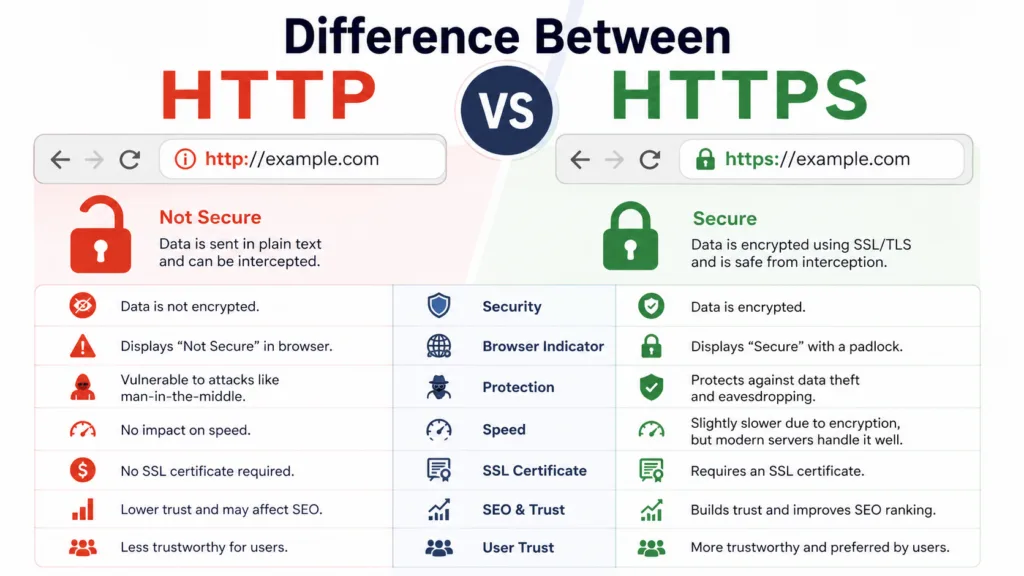
HTTP and HTTPS are protocols used to transfer information between a web browser and a server. The key difference is security: HTTP does not encrypt data, while HTTPS uses TLS encryption to protect information exchanged between the website and visitor. HTTPS also helps verify the website connection, protects sensitive data, builds user trust, and is the preferred standard for modern websites.
When you visit a website, you may notice that its web address begins with either HTTP or HTTPS. At the same time, the difference may appear to be only one letter; that extra “S” stands for Secure and represents an important layer of protection for information exchanged between your browser and a website.
For modern websites, HTTPS is no longer simply an optional security feature. It plays an important role in protecting visitors, building trust, supporting secure online transactions, and maintaining a professional web presence.
But what exactly is the difference between HTTP and HTTPS? How does HTTPS protect your website and visitors? Does HTTPS affect Google rankings? And does every New Zealand business website need it?
This guide explains everything you need to know about HTTP and HTTPS in simple terms.
HTTP stands for Hypertext Transfer Protocol. It is a communication protocol that allows web browsers and web servers to exchange information.
Whenever you enter a website address into your browser, your browser needs to communicate with the server where that website is hosted. HTTP provides the rules that allow this communication to take place.
For example, when you visit a webpage, your browser may request:
The web server then sends those resources back to your browser.
The main problem with standard HTTP is that the information exchanged between the browser and server is generally not encrypted. This means that if someone manages to intercept the connection, the data could potentially be viewed or manipulated.
This is particularly concerning when a website handles sensitive information such as login credentials, contact information, payment details, or personal data.
HTTPS stands for Hypertext Transfer Protocol Secure.
It works similarly to HTTP but adds encryption through TLS (Transport Layer Security). You may also hear people refer to SSL certificates when discussing HTTPS. SSL is the older technology that TLS replaced, although the term “SSL certificate” is still commonly used.
When a website uses HTTPS, information travelling between the visitor’s browser and the website server is encrypted.
This makes it significantly harder for unauthorised parties to read or alter the information being transferred.
You can usually identify an HTTPS website by looking at the browser’s address bar. A secure website normally begins with:
https://
Modern browsers may also display a padlock or another security indicator beside the website address.
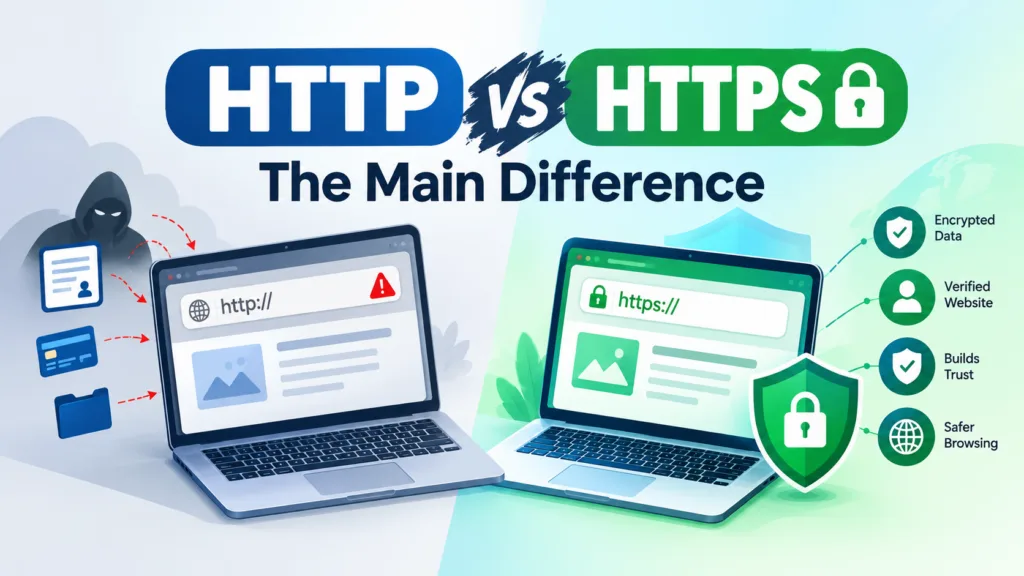
The simplest way to understand the difference is this:
HTTP transfers information without the protection provided by encrypted HTTPS connections, while HTTPS uses TLS encryption to protect data exchanged between a browser and server.
The key differences include:
| Feature | HTTP | HTTPS |
| Full name | Hypertext Transfer Protocol | Hypertext Transfer Protocol Secure |
| Encryption | No TLS encryption | Uses TLS encryption |
| Data protection | Limited | Stronger protection |
| Website verification | No certificate required | Requires a valid TLS certificate |
| Browser trust | May show security warnings in certain situations | Generally provides a secure connection indicator |
| Suitable for sensitive data | Not recommended | Recommended |
| Modern website standard | Outdated for secure websites | Preferred |
HTTPS therefore provides an additional security layer that standard HTTP does not.
HTTPS may sound complicated, but its basic purpose is straightforward.
When you connect to an HTTPS website, your browser establishes a secure connection with the website’s server using TLS.
During this process, the browser and server negotiate security settings and establish encryption keys. The server also provides a digital certificate that helps prove that the connection is associated with the intended website.
Once the secure connection has been established, information exchanged between the browser and server is encrypted.
For example, imagine that a customer submits a contact form containing their name, phone number, and email address.
With a properly configured HTTPS connection, that information is encrypted while travelling between the customer’s browser and your website server.
Without HTTPS, the connection does not provide the same level of protection.
HTTPS is important for almost every modern business website, regardless of its size.
A visitor might not consciously check whether a website uses HTTPS, but browsers increasingly make security visible. Security warnings can make visitors hesitate before continuing with a website.
For businesses, trust is extremely important.
A website may contain excellent content, attractive design, and strong calls to action, but if visitors receive a security warning, they may leave before contacting the business.
This can affect:
For this reason, HTTPS should be considered a fundamental part of running a professional website.
One of the biggest benefits of HTTPS is encryption.
Websites can exchange many types of information, including:
HTTPS helps prevent this information from being easily read if the connection is intercepted.
For an ecommerce website, this is particularly important because customers expect their information to be handled securely.
Even websites that do not process payments can benefit from HTTPS because contact forms, login pages, and other interactive features may still collect personal information.
Encryption is not the only benefit of HTTPS.
HTTPS also helps protect the integrity of information travelling between a browser and server.
Without adequate connection security, an attacker could potentially interfere with data in transit.
For example, malicious code or unwanted content could potentially be inserted into an insecure connection.
HTTPS makes this type of interference significantly more difficult by protecting the communication channel.
Trust is one of the most important factors in online business.
Think about how you would feel if you opened an online store and your browser immediately displayed a security warning.
You might wonder:
“Is this website safe?”
“Should I enter my details?”
“Can I trust this business?”
Even if the business itself is legitimate, the warning can create unnecessary doubt.
HTTPS gives visitors greater confidence that their connection to the website is protected.
This is especially valuable for New Zealand businesses that rely on their websites to generate enquiries, sell products or communicate with customers.

HTTPS is also relevant to search engine optimisation.
Google has treated HTTPS as a ranking signal for many years. However, it is important not to think of HTTPS as a magic SEO solution.
Switching from HTTP to HTTPS will not automatically move a website from page ten to page one.
Search rankings depend on many factors, including:
HTTPS is better understood as a basic technical and security requirement rather than a shortcut to higher rankings.
A secure website can also provide a stronger foundation for other SEO work.
HTTPS itself is not something businesses should avoid because of performance concerns.
Modern web infrastructure is designed to support secure connections efficiently. In many cases, HTTPS works alongside technologies such as HTTP/2 and HTTP/3 that can improve how website resources are delivered.
However, website performance depends on many other factors.
For example, a slow website may be caused by:
Therefore, if a website is slow, the solution is usually broader than simply looking at HTTP or HTTPS.
A TLS certificate is a digital certificate used to help establish a secure HTTPS connection.
It helps a browser verify the identity of a website and enables encrypted communication between the visitor and the server.
When a website has a properly configured certificate, visitors can connect through HTTPS without receiving certificate-related security warnings.
Certificates can be issued through different certificate authorities, and many hosting providers offer certificates as part of their hosting packages.
Some providers also offer free automated certificates, making HTTPS accessible to businesses of all sizes.
HTTPS does not necessarily require a business to purchase an expensive security certificate.
Many hosting companies provide free TLS certificates through services such as Let’s Encrypt.
The cost therefore depends on the hosting provider, certificate type, and website requirements.
Businesses should focus less on whether the certificate is paid or free and more on whether the HTTPS implementation is valid, correctly configured, and properly maintained.
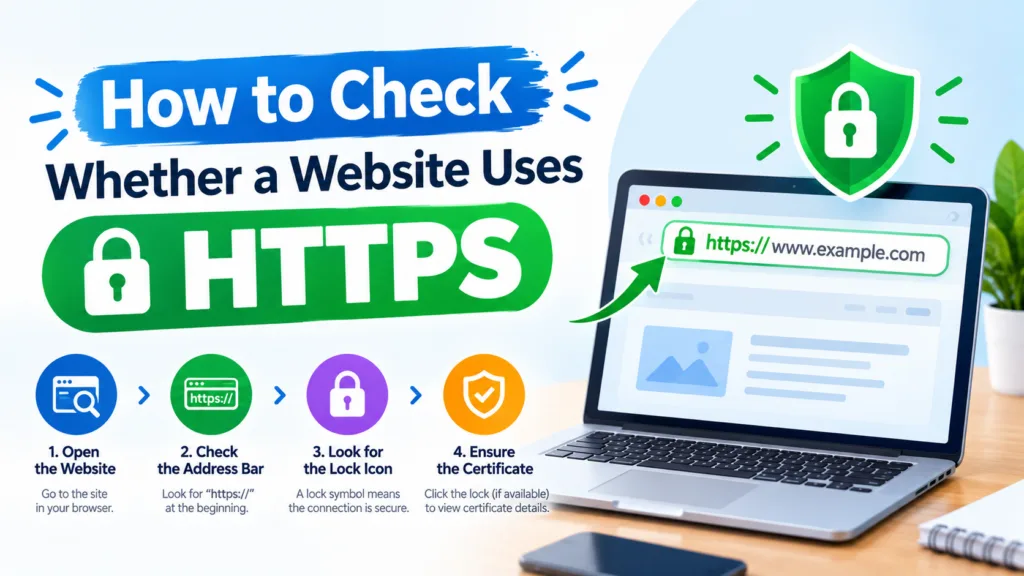
Checking HTTPS is simple.
Open the website in your browser and look at the address bar.
A secure website should normally use:
https://example.co.nz
instead of:
http://example.co.nz
You can also click the browser’s security indicator to view information about the connection and certificate.
If the website loads through HTTPS but displays certificate warnings, mixed-content warnings, or other security problems, the configuration may require attention.
Mixed content occurs when an HTTPS webpage attempts to load some resources through an insecure HTTP connection.
For example, a webpage may correctly load through:
https://example.co.nz
but attempt to load an image from:
http://example.com/image.jpg
This creates a security problem because part of the page is being requested through an insecure connection.
Mixed content can occur after a website migration from HTTP to HTTPS, particularly when old image URLs, scripts, or stylesheet references remain unchanged.
A proper HTTPS migration should therefore check all website resources rather than simply installing a certificate.
Moving a website from HTTP to HTTPS involves more than purchasing or activating a certificate.
A typical migration can include:
A poorly managed migration can create duplicate URLs or cause unnecessary crawling and indexing problems.
For this reason, HTTPS migration should be handled carefully, particularly on large websites.
Suppose your original page is:
http://example.co.nz/services/
After migration, the preferred version becomes:
https://example.co.nz/services
The old HTTP URL should generally redirect to the corresponding HTTPS URL using a permanent redirect.
This helps visitors and search engines reach the correct version of the page.
Without appropriate redirects, users may encounter duplicate versions, broken links, or inconsistent URL signals.
A proper redirect strategy is therefore an important part of an HTTPS migration.
For New Zealand businesses, having a secure website is particularly important when customers are expected to submit information online.
Whether you operate a local service business, professional consultancy, online store or nationwide company, HTTPS contributes to a more trustworthy online experience.
For example, a business investing in web design Auckland should ensure that security is considered alongside visual design, mobile responsiveness, usability and SEO.
A website should not only look professional. It should also provide a secure experience for visitors.
Similarly, businesses investing in Website Design NZ should consider HTTPS as part of the website’s technical foundation rather than treating it as an optional extra.
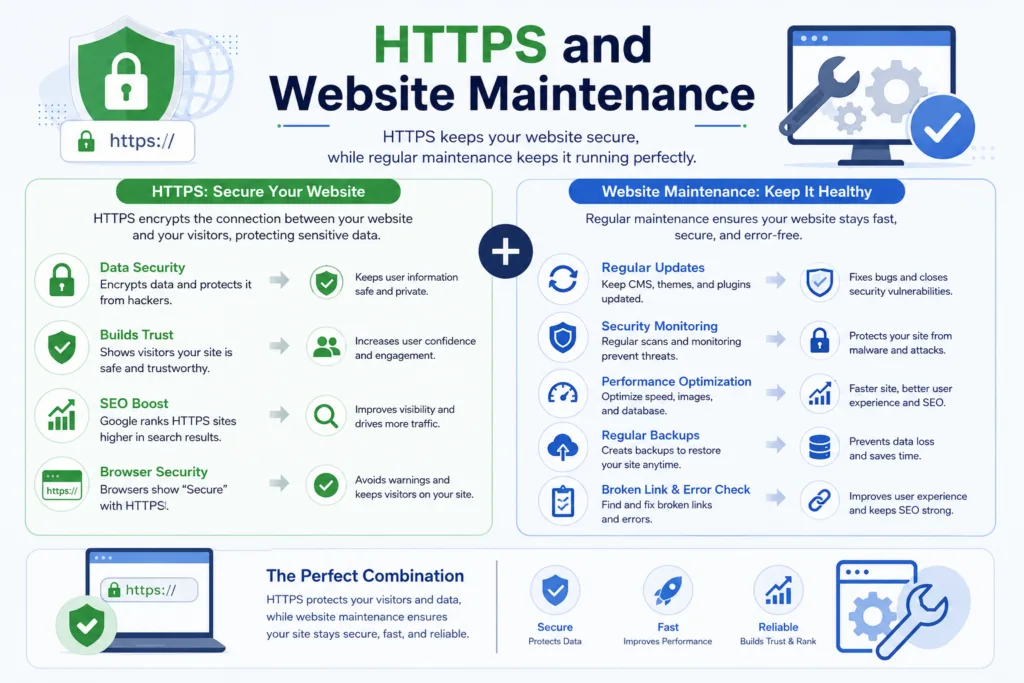
Installing HTTPS once does not mean website security can be ignored forever.
Certificates can expire, website plugins can change, redirects can break, and new resources can accidentally be added using HTTP.
Regular technical checks can identify these issues before they create larger problems.
Professional Website Maintenance Services can help businesses monitor website health, security, updates, redirects, performance, and technical issues over time.
Regular maintenance is particularly useful for businesses that depend heavily on their websites for enquiries and sales.
Although HTTPS is generally straightforward, websites can experience configuration issues.
Some common problems include:
If a certificate expires, visitors may receive a browser security warning.
Automated certificate renewal can reduce this risk, but renewal should still be monitored.
Poorly configured redirects can create redirect chains, loops, or incorrect destination pages.
Old HTTP resources can cause security warnings or prevent certain resources from loading correctly.
Canonical tags should generally point to the preferred HTTPS versions of pages.
If both versions remain accessible without appropriate redirects and canonicalisation, search engines may receive conflicting signals.
Internal links should ideally point directly to HTTPS URLs rather than unnecessarily passing through HTTP redirects.
It would be too simplistic to say that every HTTP website is automatically dangerous.
The main issue is that HTTP does not provide the same encrypted transport protection as HTTPS.
For a simple informational page containing no sensitive information, the immediate risk may be lower than for an online banking or ecommerce website.
However, modern websites should generally use HTTPS because there is little reason to continue relying on an unsecured HTTP connection.
HTTPS is now the expected standard for professional websites.
For virtually every modern website, HTTPS is the recommended choice.
Whether you operate a small New Zealand business website, an online store, a blog, or a large corporate website, HTTPS provides important benefits.
It protects data, supports user trust, helps create a secure technical foundation, and aligns with modern web standards.
The decision is therefore quite simple:
HTTP is the older, unsecured protocol, while HTTPS adds TLS-based security and encryption to web communication.
The difference between HTTP and HTTPS may look small, but the additional security provided by HTTPS is significant.
HTTP allows browsers and servers to communicate, but it does not provide the same encrypted protection. HTTPS adds TLS encryption and helps protect information exchanged between visitors and websites.
For businesses, HTTPS should be considered a basic requirement rather than an optional feature. It can help protect customer information, improve trust, support modern website technology, and provide a stronger technical foundation for SEO.
If your website still uses HTTP, or if your HTTPS setup has certificate, redirect, or mixed-content problems, it is worth addressing the issue sooner rather than later.
A secure website is not only about protecting data. It is also about giving visitors confidence when they interact with your business online. Whether you’re building a new website or improving an existing one, HTTPS should be part of the foundation from day one. This is one of the areas where a professional approach to website development and ongoing technical care can make a meaningful difference. For businesses working with providers such as i2D, ensuring website security is an important part of maintaining a reliable online presence.
Yes, HTTPS is preferable for SEO because Google uses HTTPS as a lightweight ranking signal, and secure websites provide a safer user experience. However, HTTPS alone will not guarantee higher search rankings.
HTTPS is strongly recommended for almost all modern websites. It is especially important for websites that collect passwords, personal information, payment details, or other sensitive data.
No. HTTPS protects data travelling between the browser and server, but it does not guarantee that the website itself is free from malware, vulnerabilities, or other security problems. Website security requires ongoing protection and maintenance.
Yes. Most websites can be migrated from HTTP to HTTPS by installing a TLS certificate, configuring the server, implementing redirects, and updating website URLs. The migration should be tested carefully to avoid technical SEO and functionality issues.
HTTPS does not always cost money. Many hosting providers offer free TLS certificates, while paid certificates may be available for businesses requiring specific features or validation levels.
Look at the website address in your browser. If the address begins with https://, the website is using HTTPS. Your browser may also display a security indicator beside the address.
 Development
When browsing websites or using mobile apps, you’ve likely encountered the terms UI and UX. These buzzwords appear everywhere in the digital world, yet many...
Read More SEO
SEOGoogle’s search algorithms are always changing, so anyone who wants to do SEO well needs to know what E-E-A-T means. This new framework adds Experience...
Read More SEO
SEOYour online presence can be made or broken by the right SEO Auckland agency. There are hundreds of agencies that say they are the best....
Read More