 Development
What Is the Difference Between UI and UX? A Complete i2d Guide
When browsing websites or using mobile apps, you’ve likely encountered the terms UI and UX. These buzzwords appear everywhere in the digital world, yet many...
Read More

Stripe Payment Gateway Integration Stripe payment gateway integration is the process of connecting Stripe’s online payment processing system to a website, eCommerce store or application....


Stripe payment gateway integration is the process of connecting Stripe’s online payment processing system to a website, eCommerce store or application. It allows businesses to accept credit cards, debit cards and supported digital payment methods securely. By integrating Stripe, New Zealand businesses can process online transactions, manage recurring payments, issue refunds and monitor payments through a central dashboard. It also provides tools for fraud prevention, payment authentication and international transactions, making it a practical solution for businesses selling products and services online.
Online payments have become an essential part of running a successful business. Customers expect a simple, secure and convenient way to purchase products or services without unnecessary steps. Whether someone is buying clothing from an online store, booking a professional service or subscribing to a digital platform, the payment experience can influence their decision to complete a purchase.
For businesses in New Zealand, providing reliable online payment options is particularly important as more customers choose to shop and interact with businesses digitally. A complicated checkout process, limited payment options or concerns about payment security can cause potential customers to abandon their purchases.
This is where Stripe payment gateway integration becomes valuable. Stripe provides payment processing technology that allows businesses to accept online payments through their websites and applications. It offers flexible integration options, supports different payment methods and provides tools to manage transactions.
However, integrating a payment gateway involves more than simply adding a payment button to a website. Businesses need to consider website compatibility, checkout design, payment security, transaction handling and customer experience.
In this guide, we explore how Stripe works, how businesses can integrate it into their websites, its major benefits and the important factors to consider before getting started.
Stripe is an online payment processing platform that enables businesses to accept and manage digital payments. It acts as a connection between a business’s website, its customers and the financial systems involved in processing transactions.
Stripe payment gateway integration means connecting this payment infrastructure to a website or application so customers can complete purchases online.
Once integrated, customers can select their preferred payment option, enter the required payment information and submit their transaction. Stripe processes the payment and communicates the result to the website.
For example, imagine a New Zealand clothing retailer selling products through an eCommerce website. When a customer adds a product to their cart and proceeds to checkout, Stripe can securely handle the payment process. Following successful payment confirmation, the website can record the order and begin the fulfilment process.
Stripe can support several business models, including:
Its flexibility makes it suitable for both small businesses and larger organisations.
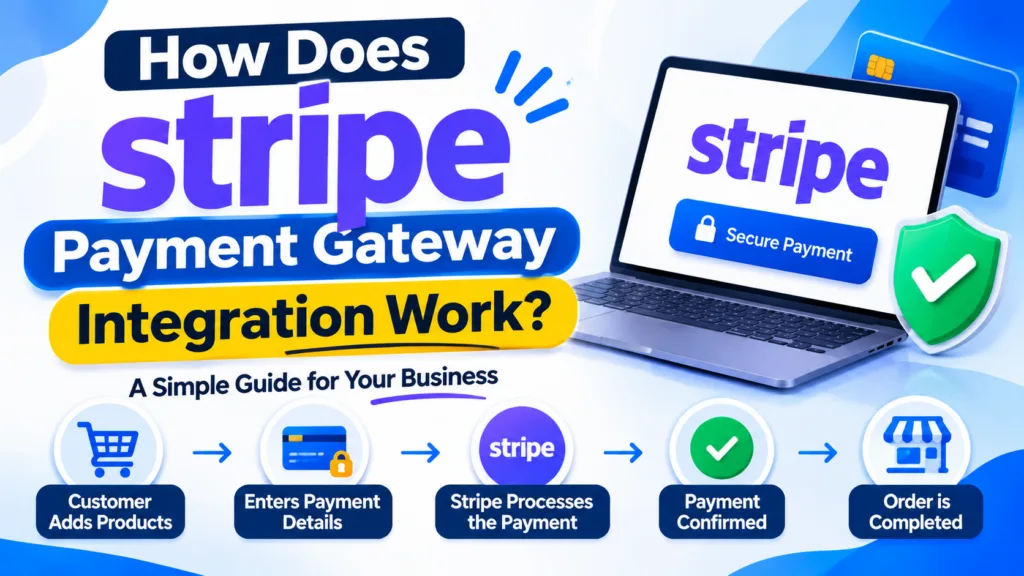
Understanding the payment process helps businesses see why proper integration is important.
Although the technical setup can vary depending on the website platform, the general payment journey follows a similar process.
The process begins when a customer visits a website and chooses a product or service. They add the selected item to their shopping cart or proceed directly to the payment page.
The website calculates the order total, including applicable charges, and displays the final amount before payment.
Once the customer is ready to purchase, they move to the checkout page. This is where Stripe’s payment interface becomes available.
Depending on the integration method, customers may be redirected to a Stripe-hosted checkout page or complete the transaction through an embedded payment form.
The customer enters their payment details or selects an available payment method.
Stripe provides payment interfaces and security features designed to help protect sensitive payment information during the transaction.
Stripe communicates with the relevant financial networks and payment providers to process the transaction.
The payment can be approved or declined depending on factors such as available funds, card information, authentication requirements and the issuing bank’s response.
After the transaction, Stripe communicates the payment status to the website.
A properly configured integration uses webhooks to receive important payment events. This allows the website to update order information, send confirmation emails and initiate fulfilment processes.
The business can access its Stripe Dashboard to review payments, monitor transactions, process eligible refunds and manage other payment-related activities.
This creates a more organised payment management process without requiring businesses to manually track every transaction.

Choosing the right payment gateway can make a significant difference to daily business operations. Stripe offers several useful features that can support online businesses as they grow.
Payment security is one of the biggest concerns for customers shopping online. People want confidence that their personal and financial information will be handled responsibly.
Stripe provides security infrastructure, encryption and fraud prevention capabilities to help protect online transactions.
It also offers tools such as Stripe Radar, which helps identify and prevent potentially fraudulent payment activity.
For New Zealand businesses, having a recognised payment processing platform can help create a more trustworthy checkout experience.
Different customers prefer different payment methods. Some use traditional debit or credit cards, while others prefer digital wallets or alternative payment options.
Stripe supports a range of payment methods, depending on business location, currency, account eligibility and integration configuration.
These can include:
Offering suitable payment options can make purchasing more convenient and reduce unnecessary barriers during checkout.
Many New Zealand businesses sell products and services beyond their local market. An online store might receive orders from Australia, the United Kingdom, the United States and other international locations.
Stripe supports multiple currencies and international payment processing, allowing eligible businesses to serve customers in different markets.
This can be particularly useful for eCommerce businesses, digital service providers and companies looking to expand internationally.
Managing transactions manually can become difficult as a business receives more orders.
Stripe provides a central dashboard where businesses can review payment activity, identify successful and unsuccessful transactions, manage refunds and access payment information.
This makes financial administration more organised and reduces the need to depend entirely on manual payment tracking.
Businesses that offer monthly memberships, software subscriptions, maintenance packages or ongoing services often need a reliable way to collect recurring payments.
Stripe supports recurring billing through its billing tools.
Businesses can configure subscription plans, billing intervals and customer payment management options. This helps automate regular collections and reduces the administrative work involved in manually requesting payments.
A lengthy or confusing checkout process can discourage customers from completing purchases.
Stripe provides different checkout options designed to simplify the payment journey. Businesses can use hosted checkout pages, embedded payment forms or more customised payment interfaces.
These options can be adapted to different website requirements while maintaining a consistent brand experience.

Not every business requires the same payment functionality. The appropriate integration method depends on the website platform, technical requirements and the desired customer experience.
Stripe Checkout is a pre-built payment page that businesses can use without developing an entire payment interface from scratch.
Customers are directed to a Stripe-hosted checkout page where they can enter their payment details and complete their purchases.
Best suited for: Small businesses, eCommerce websites and companies looking for a straightforward payment solution.
Payment Links allow businesses to create shareable payment pages directly through the Stripe Dashboard.
A business can share a payment link through email, social media, messaging platforms or its website.
This option is useful for businesses that want to accept payments without building a complex online checkout system.
Best suited for: Freelancers, consultants, service providers and businesses accepting individual payments.
Stripe Elements provides customisable user interface components that developers can use to build payment forms directly into websites.
It offers greater control over the checkout experience, including how payment fields appear and how they fit within the website design.
Best suited for: Businesses that need a customised payment experience and more control over their checkout functionality.
For websites and applications with advanced requirements, developers can integrate Stripe using its APIs.
This approach allows businesses to build customised payment workflows, connect payment processing with internal systems and automate specific operations.
Best suited for: Large eCommerce platforms, custom applications, marketplaces and businesses with specialised payment requirements.
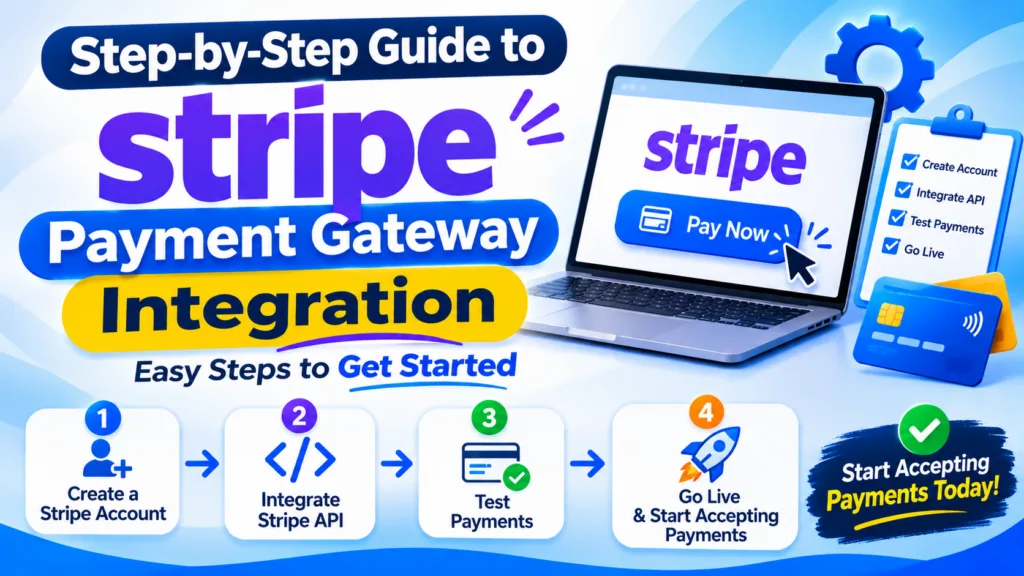
Integrating Stripe requires proper planning and technical configuration. Here is a general process businesses can follow.
The first step is to create a Stripe account through the official Stripe website.
Businesses need to provide the requested information during registration and complete the relevant identity and business verification requirements.
For New Zealand businesses, it is important to ensure that the business meets Stripe’s eligibility requirements and has the necessary banking and business details.
After creating an account, businesses can access the Stripe Dashboard.
This is where they can manage payment settings, review transactions, configure supported payment methods and access API credentials.
The dashboard also provides a test environment for developers to check payment functionality before making the integration live.
The next step is selecting an appropriate integration method.
For example, a business using an eCommerce platform may be able to connect Stripe through an existing payment plugin.
A custom website may require API integration or Stripe Elements.
The decision should be based on the website’s technology, required functionality and long-term business goals.
Once the integration method has been selected, developers can connect the website with Stripe.
This may involve installing and configuring a payment plugin, adding API credentials or implementing the required payment functionality.
For custom integrations, developers typically use Stripe’s official SDKs and APIs.
Important: Secret API keys must remain on the server side and should never be exposed in public website code.
Businesses can enable the payment methods they want to offer customers.
The available options depend on account eligibility, country, currency and the selected Stripe integration.
For New Zealand customers, businesses should consider which payment methods are most relevant to their audience rather than enabling unnecessary options.
Before accepting real payments, it is important to test the complete checkout process.
Developers should check:
Testing helps identify technical problems before customers start using the payment system.
After successful testing, the integration can be switched to live mode using the appropriate live credentials.
Businesses should complete a final review of the checkout experience and ensure that the payment process works correctly.
Once everything is verified, customers can begin making real payments through the website.
Payment security should never be treated as an optional feature. A poorly configured integration can create unnecessary risks for both customers and businesses.
Here are some important considerations.
Use HTTPS: Your website should have a valid SSL/TLS certificate so information exchanged between the browser and website is protected during transmission.
Protect API Keys: Secret API credentials should be stored securely on the server and never included in publicly accessible JavaScript or website files.
Verify Webhooks: Stripe webhook signatures should be verified before your website processes incoming payment events. This helps confirm that the notifications are genuine.
Follow PCI DSS Requirements: Businesses must understand their applicable Payment Card Industry Data Security Standard (PCI DSS) responsibilities. Using Stripe-hosted payment interfaces can reduce the amount of sensitive card data handled directly by a website, but it does not remove every compliance responsibility.
Monitor Suspicious Transactions: Stripe Radar and other fraud prevention controls can help identify potentially suspicious payment activity.
Keep Website Software Updated: Plugins, themes, frameworks and other website components should be maintained to reduce security vulnerabilities.
Even a well-planned payment integration can encounter technical issues. Identifying common problems early can help prevent interruptions.
Using the wrong API keys or mixing test and live credentials can cause payment failures.
Developers should verify that the correct credentials are configured for each environment.
Some plugins and website platforms may have compatibility problems with particular themes, extensions or software versions.
Testing the integration with the existing website setup can help prevent these issues.
Incorrect webhook URLs, missing event subscriptions or failed signature verification can prevent a website from receiving important payment notifications.
Proper endpoint configuration and testing are essential.
Also Read: How to Fix 500 Internal Server Error
Customers may complete a payment but fail to return to the correct confirmation page if redirect URLs are incorrectly configured.
Developers should test both successful and cancelled payment journeys.
A payment form that works perfectly on a desktop computer may not provide the same experience on a mobile device.
Responsive testing is essential to ensure that payment fields, buttons and checkout layouts work correctly across different screen sizes.
Although Stripe offers documentation, plugins and pre-built payment interfaces, integrating it correctly still requires an understanding of website functionality and payment workflows.
A professional developer can assess the existing website, choose the appropriate integration method and configure the payment system according to business requirements.
This is particularly important when a website needs custom checkout functionality, subscription management, automated order processing or connections with other business systems.
Businesses investing in professional website development should also consider the overall customer journey. The checkout page should be visually consistent, easy to navigate and straightforward to use.
A well-planned web design auckland project, for example, should consider payment functionality alongside website layout, usability and conversion goals. Payment integration should feel like a natural part of the website rather than a separate or confusing experience.
The team at i2D understands the importance of creating digital experiences that support business objectives. From website functionality to online visibility, having the right technical foundation can help businesses build a stronger online presence.
The cost of Stripe integration depends on several factors, including the website platform, integration complexity and the features required.
A basic integration using a supported plugin or hosted checkout may require relatively little development work. However, a customised payment system involving APIs, subscription billing, automated invoicing or third-party software connections may require a larger investment.
Businesses should consider the following cost factors:
Stripe generally uses transaction-based pricing, although the applicable fees depend on the payment method, transaction type and business location.
New Zealand businesses should check the latest rates on the official Stripe pricing page before calculating their payment processing costs.
It is also worth budgeting for ongoing Website Maintenance Services to keep the website, payment integration and associated software working reliably.
For online retailers, a payment gateway is one of the most important parts of the purchasing process.
An effective eCommerce payment system should connect smoothly with the shopping cart, product pricing, order management and customer notifications.
For example, when a customer purchases a product, the website should calculate the correct total, submit the payment request and update the order after receiving reliable payment confirmation.
This process becomes even more important for businesses managing large product catalogues, discount codes, shipping charges and international orders.
Businesses planning a new online store should consider payment integration during the initial development stage rather than treating it as an afterthought.
Quality Website Design NZ projects should bring together functionality, usability, mobile responsiveness and secure payment processing to create a consistent customer experience.
Stripe payment gateway integration provides New Zealand businesses with a flexible way to accept online payments and manage digital transactions. From simple payment links to customised API integrations, businesses can choose an approach that suits their technical requirements and operational needs.
However, successful integration involves more than connecting a payment account. Website compatibility, security, payment confirmation, mobile usability and ongoing maintenance all play important roles in delivering a reliable checkout experience.
By choosing the right integration method and testing the complete payment journey, businesses can make online purchasing more convenient for customers while improving their payment management processes.
If you are planning to launch an eCommerce website or improve your existing payment system, exploring professional development support and a suitable Stripe integration strategy can be a valuable step towards building a more effective online business.
Yes. Stripe supports eligible businesses in New Zealand. Businesses can create an account, complete the required verification process and accept supported online payments through their websites or applications.
Yes. Stripe can be integrated into WordPress using compatible payment plugins, WooCommerce integrations or custom API development. The appropriate method depends on the website's functionality and payment requirements.
Yes. Stripe offers recurring billing functionality through Stripe Billing. Businesses can create subscription plans, collect regular payments and manage customer billing information.
Stripe provides security features, encryption, fraud prevention tools and payment authentication capabilities. Businesses should also use HTTPS, protect API credentials and configure webhook signature verification correctly.
The timeframe depends on the website platform and integration complexity. A basic plugin or hosted checkout setup may be completed relatively quickly, while custom API integrations and advanced payment workflows can take considerably longer.
Stripe generally charges transaction-based processing fees. The exact amount depends on the payment method, transaction type and applicable country-specific pricing. Businesses should review Stripe's current New Zealand pricing before integrating the service.
 Development
When browsing websites or using mobile apps, you’ve likely encountered the terms UI and UX. These buzzwords appear everywhere in the digital world, yet many...
Read More Development
A good website is more than just a nice-looking brochure. It’s often the first thing a customer sees about your brand, a great way to...
Read More Development
Most Auckland businesses pour thousands of dollars into Google Ads and SEO content — then watch their rankings plateau. The culprit? A slow website that...
Read More