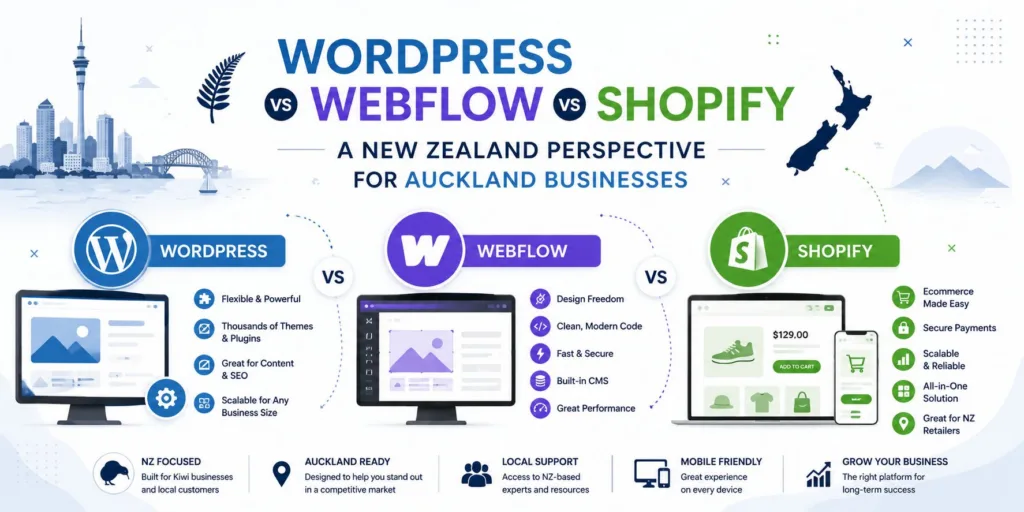
WordPress vs Webflow vs Shopify: A New Zealand Perspective for Auckland Businesses
For many Auckland business owners, the website platform decision has moved beyond a simple question of cost. The more useful question is whether a platform...
Areesh Ishtiaq
May 19, 2026
For many Auckland business owners, the website platform decision has moved beyond a simple question of cost. The more useful question is whether a platform will support growth, search visibility, customer trust and operational efficiency over the next several years. That is why the WordPress vs Webflow discussion is now often joined by Shopify, especially for New Zealand companies that need either a professional service website, a design-led marketing site, or an online store.
Recent comparison content around WordPress vs Webflow tends to focus on flexibility, design freedom, SEO tools, hosting, security, plugins, CMS workflows and long-term maintenance.
When Shopify is added to the conversation, the decision becomes more commercial: are you primarily publishing content, building brand authority, or selling products online? For Auckland businesses, the best answer depends on the website’s role in the customer journey, the internal team’s technical capability, and the level of support required after launch.
1. Why Platform Choice Matters for Auckland Businesses
A website is no longer only a digital brochure. For a local consultant, clinic, construction firm, retailer, SaaS start-up or hospitality brand, it can be a lead-generation channel, a content hub, a booking pathway, an ecommerce shopfront and a credibility signal. The platform behind that website affects page speed, mobile responsiveness, content editing, search engine optimisation, accessibility and conversion rate.
In Auckland’s competitive digital market, these factors matter because customers often compare several businesses before making contact. A slow, confusing or poorly maintained website can quietly reduce enquiries, even when the business itself is strong. Conversely, a well-structured website can support local SEO, paid campaigns, email marketing, content publishing and sales automation.
The WordPress vs Webflow debate usually begins with control versus convenience. WordPress offers a large open-source ecosystem, extensive plugins and almost unlimited customisation. Webflow offers a visual design environment, managed hosting and a more integrated workflow. Shopify is different again: it is built specifically for ecommerce, with product, checkout, inventory and payment features at its core.
What NZ businesses should assess first. Before comparing features, Auckland businesses should define the commercial job of the website. A service business that needs strong local landing pages and ongoing blog content may prioritise SEO structure and CMS flexibility. A design-led brand may value visual polish, animations and a refined user experience. A retailer with dozens or hundreds of products may need dependable checkout, product variants, shipping settings and ecommerce reporting.
The right platform is the one that reduces friction around that primary job. Choosing Shopify for a content-heavy consultancy site may feel restrictive. Choosing Webflow for a complex retail operation may create ecommerce limitations. Choosing WordPress without a maintenance plan may create avoidable security, plugin and performance issues.
2. WordPress: Flexible, Familiar and Highly Customisable
WordPress remains one of the most recognisable content management systems in the world. Its biggest advantage is flexibility. Through themes, plugins, custom post types and bespoke development, WordPress can be shaped into a service website, publication, membership site, booking platform or ecommerce store through WooCommerce. This makes it attractive for businesses that need a tailored website and want long-term ownership of their digital infrastructure.
In many WordPress vs Webflow comparisons, WordPress is described as the stronger option for backend control, plugin choice and extensibility.
It can integrate with CRM systems, marketing automation tools, analytics platforms, payment systems and specialist industry software. For Auckland companies with complex workflows or mature digital marketing needs, that breadth can be valuable.
Strengths of WordPress for service and content websites
WordPress is particularly effective for businesses that publish regularly. Its blogging history still shows in the way it manages posts, categories, tags and editorial workflows. A law firm, architect, accountant, education provider or trade business can use WordPress to create location pages, guides, case studies and landing pages that support organic visibility.
SEO performance on WordPress is often supported through plugins such as Yoast SEO or Rank Math, while developers can further optimise schema, metadata, redirects, image handling and site architecture. However, the quality of the final result depends heavily on hosting, theme build quality, plugin discipline and technical maintenance.
Limitations and maintenance considerations
WordPress is not a fully hands-off platform. Its open-source model gives businesses control, but that control brings responsibility. Core updates, plugin updates, theme updates, security hardening, backups, caching and performance optimisation all need to be managed. Several comparison sources highlight that WordPress can be free to use but not free to operate, because hosting, development time, plugin licences and maintenance all contribute to total cost of ownership.
For Auckland businesses, this means WordPress is best when there is either in-house technical confidence or a reliable agency partner. Without that support, a WordPress site can become slow, outdated or vulnerable over time.
3. Webflow: Design Freedom with Managed Hosting
Webflow appeals to businesses that want a modern, highly visual website without the same reliance on themes and plugin stacks. It combines visual development, a structured CMS and managed hosting in one platform. Designers can build responsive layouts with considerable precision, while marketers can update content through the editor once the site is properly configured.
In the WordPress vs Webflow discussion, Webflow is often positioned as the cleaner, more design-led platform. Webflow’s own comparison material emphasises reduced plugin maintenance, managed hosting, built-in security, staging, collaboration tools and faster publishing workflows.
Independent reviews often describe Webflow as strong for design freedom, performance and marketing websites, while noting that it has a smaller ecosystem than WordPress.
When Webflow suits Auckland brands
Webflow is a strong fit for Auckland businesses that rely on presentation, trust and differentiated brand experience. Creative agencies, professional services firms, consultants, SaaS companies, property-related businesses and premium local brands may benefit from Webflow’s visual control and polished interactions. It can be especially useful when the website is expected to act as a high-converting marketing asset rather than a complex application.
The platform can also suit teams that want fewer maintenance tasks. Managed hosting, automatic platform updates and built-in performance infrastructure reduce some of the operational burden that comes with WordPress. For a small team, this can be a practical advantage.
Webflow trade-offs to understand
Webflow is not always the simplest choice for every business. Its visual development interface has a learning curve, and deeper customisation may still require a skilled designer or developer. Its CMS is powerful for many marketing websites, but WordPress can be more flexible for complex content models, large plugin-driven ecosystems or unusual backend workflows.
Webflow ecommerce exists, but it is generally not the strongest option for complex online retail. If a business needs advanced product filtering, multi-channel selling, sophisticated inventory management or a large app ecosystem, Shopify will usually be the more natural fit.
4. Shopify: Ecommerce-First for Product Businesses
Shopify belongs in this comparison because many New Zealand businesses are not simply choosing between WordPress vs Webflow. They are deciding whether their website should be primarily a marketing platform or a sales platform. Shopify was built for ecommerce from the beginning, which gives it a clear advantage for product-based businesses.
A Shopify store includes core ecommerce functions such as product management, checkout, payment options, inventory tools, shipping settings, discount codes and security features. Comparison sources that include all three platforms tend to describe Shopify as the most focused choice for online selling, while WordPress is more flexible for content and Webflow is stronger for visual design.
When Shopify is the better option
Shopify is usually the best fit when the business sells physical or digital products and needs a reliable, scalable checkout. Auckland retailers, boutique product brands, food and beverage businesses, subscription product companies and direct-to-consumer start-ups may find Shopify more efficient than building ecommerce from scratch elsewhere.
Its app ecosystem is also useful. Businesses can connect email marketing, reviews, loyalty programmes, shipping apps, accounting tools and analytics systems. For teams that want to launch quickly and reduce technical complexity, Shopify’s managed ecommerce environment can be a major advantage.
Shopify limitations for content-led brands
The trade-off is that Shopify is not primarily a content management system for service businesses. It can support pages and blogs, but its strengths sit around products, carts and transactions. If a company’s growth depends on extensive service pages, technical articles, resource hubs or highly customised landing page structures, WordPress or Webflow may be a better foundation.
Shopify can also become more expensive as a business adds premium themes, apps and custom development. The platform is convenient, but convenience still needs to be measured against long-term requirements.
5. WordPress vs Webflow vs Shopify: Practical Comparison
The most productive way to compare these platforms is to map each one to a business model. Auckland businesses should avoid choosing a platform because it is popular overseas or because a competitor uses it. The decision should reflect internal capability, customer expectations, content needs, ecommerce complexity and future marketing plans.
Decision factor
WordPress
Webflow
Shopify
Best fit
Content-rich and service-based websites
Design-led marketing websites
Ecommerce and product-based stores
Core strength
Flexibility and plugin ecosystem
Visual design and managed hosting
Checkout, products and retail operations
SEO capability
Strong, especially with correct setup and plugins
Strong built-in tools for many marketing sites
Good ecommerce SEO foundations
Maintenance
Requires updates, backups and security management
Lower maintenance due to managed platform
Managed ecommerce platform with app upkeep
Customisation
Very high with developer support
High for visual and front-end design
Strong for ecommerce, less flexible for non-retail content
Typical risk
Plugin bloat and poor maintenance
Platform learning curve and ecosystem limits
App costs and design/content constraints
SEO, speed and local visibility
For local visibility in Auckland, the platform is only one part of the equation. Site architecture, keyword research, page content, metadata, internal links, schema, image optimisation and page speed all influence results. WordPress can perform extremely well when configured correctly. Webflow often produces clean, fast marketing sites with built-in SEO controls. Shopify can rank well for product and category searches when collections, product pages and technical settings are managed carefully.
The key is not whether one platform is automatically better for SEO. The key is whether the chosen platform allows your team or agency to create the pages, content structure and technical foundations your search strategy requires.
Accessibility, compliance and user experience
Accessibility should be part of the website decision from the beginning. The phrase WCAG for NZ Businesses is increasingly relevant because accessible design is not only about compliance; it is about making sure more people can use your website. In practical terms, this includes readable typography, keyboard navigation, colour contrast, meaningful alt text, logical heading structure and forms that are easy to understand.
WordPress, Webflow and Shopify can all support accessible outcomes, but none guarantees them automatically. Accessibility depends on design decisions, theme or template quality, developer implementation and content governance. For Auckland businesses investing in a new website, accessibility should be treated as a quality standard, not an afterthought.
Cost, support and long-term ownership. Initial build cost is only one part of the platform decision. A cheaper website can become expensive if it requires constant fixes, performs poorly or blocks marketing activity. A more structured investment can be better value if it improves enquiry quality, ecommerce revenue and operational efficiency.
WordPress costs often include hosting, development, premium plugins and maintenance. Webflow costs are usually more subscription-based, with reduced server maintenance but possible agency support for design and CMS changes. Shopify costs include subscription fees, transaction considerations, apps, themes and ecommerce development when required.
For local businesses that need strategic guidance, working with a professional Auckland team can reduce risk. If you are planning a new site or a redesign, Website Design Auckland support can help align platform choice with brand, SEO, user experience and conversion goals.
6. Final Recommendation for New Zealand Businesses
The simplest recommendation is this: choose WordPress if content depth, flexibility and custom development matter most; choose Webflow if brand presentation, design control and lower platform maintenance are priorities; choose Shopify if ecommerce is the centre of the business. The WordPress vs Webflow question is important, but Shopify changes the decision when products, checkout and inventory become central.
For Auckland service businesses, WordPress often remains a strong option when there is a plan for SEO, content marketing and ongoing support. Webflow is compelling when the business needs a premium, design-led marketing site with efficient publishing and managed hosting. Shopify is the practical choice when the website’s primary job is to sell products reliably.
The best platform is not the one with the longest feature list. It is the one that fits your business model, your team and your next stage of growth. A clear decision now can prevent an expensive migration later, while giving your website the structure it needs to support customers, search engines and commercial performance.


 Landing Pages