CMS Selection Guide for Business Websites in Auckland
Choosing the right content management system is one of the most important early decisions for modern Business Websites. A CMS is not merely a place...
Areesh Ishtiaq
May 21, 2026
Choosing the right content management system is one of the most important early decisions for modern Business Websites. A CMS is not merely a place to edit text. It shapes how quickly a team can publish new service pages, how safely customer data is handled, how well the site supports search engine optimisation, and how easily the business can grow into ecommerce, bookings, marketing automation or multi-location content. For Auckland companies competing in a concentrated local market, the best CMS is the one that supports both day-to-day website management and long-term commercial goals.
International comparison pages and CMS guides tend to agree on one central point: a business website is the digital front door of an organisation, and its platform must support clear communication, trust, visibility and conversion. Awwwards describes business and corporate websites as digital fronts that communicate company values, services and brand identity to clients, partners and investors.
Practical website guides also stress domains, website pages, SEO, content planning, promotion and metrics as core parts of setting up a business website.
For Auckland businesses, those points translate into a simple but strategic question: which CMS will help your team publish better content, attract qualified leads and maintain a professional online presence without unnecessary complexity?
Why CMS Choice Matters for Business Websites in Auckland
Auckland is a competitive service and retail market, which means Business Websites need more than a polished homepage. They need fast-loading pages, clear calls to action, mobile responsive design, local SEO, analytics, secure hosting and a publishing workflow that allows the business to keep information current. A CMS should make those requirements easier, not harder.
Adobe defines a CMS as software that helps teams create, manage and publish digital content without relying on custom code, while also supporting collaboration across marketing, IT and digital teams.
IBM similarly explains that a content management system helps users create, manage, store and modify digital content through a user-friendly interface.
In practice, this means your CMS determines who can update your website, how content is approved, which integrations are possible and how efficiently the site can evolve.
The CMS is the operating system for your website
For many Auckland organisations, the CMS becomes the operational layer behind the website. It controls service pages, landing pages, blog posts, team profiles, image libraries, contact forms, ecommerce products, booking forms, metadata and sometimes customer journeys. If the CMS is difficult to use, website updates slow down and opportunities are missed. If it is too basic, the business may outgrow it within a year. If it is too complex, staff may avoid using it and rely on developers for every small change.
Website management affects marketing speed
Marketing speed matters because customers often compare providers before making contact. Square’s business website setup guide notes that customers commonly research businesses online before visiting, and a website gives the business a chance to own its narrative.
A CMS that supports quick content editing, structured service pages and easy publishing helps an Auckland business respond to seasonal campaigns, new offers, Google Business Profile activity and customer questions without rebuilding the site every time.
What a Good CMS Should Do for Business Websites
A good CMS should serve both content creators and customers. It must make editing simple for internal users while delivering a fast, accessible and persuasive experience for visitors. The strongest CMS platforms typically support content editing tools, templates, role-based permissions, SEO controls, analytics, integrations and security measures.
CMS guides commonly refer to features such as drag-and-drop editing, workflow and approval processes, version control, content scheduling, digital asset management, analytics, personalisation, structured data and XML sitemaps.
Those features are not only relevant to large enterprises. They also help Small Businesses maintain professional standards when they do not have a full in-house digital team.
Content editing and publishing workflow
A user-friendly interface is essential. Staff should be able to edit page copy, add images, update calls to action, publish blog content and adjust landing pages without touching code. For larger teams, the CMS should also include permissions and an approval process so draft content can be reviewed before publication. IBM highlights publishing controls, permissions and workflow as important CMS features because they help prevent mistakes and protect the organisation’s brand.
SEO, analytics and performance tools
A CMS should make search engine optimisation practical. That means editable title tags, meta descriptions, headings, URL slugs, image alt text, XML sitemaps and structured data where relevant. It should also integrate cleanly with analytics tools so the business can review website metrics such as traffic sources, conversions and page performance. Brightspot notes that security and performance are important CMS considerations and that page speed can influence SEO rankings.
For Business Websites in Auckland, this matters because local search visibility is often tied to page quality, relevance and user experience.
Integrations for sales and operations
The right CMS should connect with the systems the business already uses. These may include a CRM, email marketing platform, booking system, ecommerce checkout, POS, inventory management, payment gateway, forms, automation software or digital asset management system. Squarespace’s small business website material shows how website platforms increasingly bundle domains, business email, ecommerce, appointment bookings, payments, client management, email campaigns and analytics into one operating environment.
Whether you choose an all-in-one platform or a more flexible CMS, integrations should be assessed before committing.
Comparing Popular CMS Options for Auckland Businesses
There is no single best CMS for every Auckland business. The right choice depends on content volume, technical needs, budget, staff capability, growth plans, compliance requirements and whether the website is primarily for leads, ecommerce, bookings or publishing. The following comparison summarises common options for Business Websites.
CMS / Platform
Best fit
Main advantage
Key watch-out
WordPress
Service businesses, content-led websites, SEO campaigns and flexible builds
Large plugin ecosystem and strong content ownership
Requires updates, security care and disciplined plugin management
Webflow
Design-led marketing sites and polished brand experiences
Visual design control with clean front-end output
Advanced content structures may need specialist support
Shopify
Ecommerce-first retailers and product catalogues
Strong checkout, inventory and payment ecosystem
Service-led content can need extra planning
Squarespace / Wix
Simple brochure sites and rapid launches
Easy drag-and-drop editing and bundled tools
May become restrictive for advanced SEO or integrations
HubSpot CMS
Businesses using HubSpot CRM and marketing automation
CRM, forms, reporting and content in one ecosystem
Cost and platform lock-in should be considered
Drupal / Headless CMS
Larger, complex or multi-channel organisations
Security, governance and custom architecture
Higher development and maintenance complexity
WordPress for flexible content and SEO
WordPress is often the default option for content-rich business websites because it is flexible, widely supported and suitable for service pages, blogs, landing pages and integrations. Brightspot identifies WordPress as a popular CMS with a broad theme and plugin ecosystem, but also warns that platform and plugin updates are important for security.
For Auckland businesses that expect to invest in ongoing SEO, publish regular resources or connect specialist tools, WordPress can be a strong choice when it is professionally configured and maintained.
Webflow for design-led marketing websites.
Webflow is often suitable when brand presentation, animation, interaction design and visual polish are priorities. It can work well for agencies, consultants, architects, technology companies and professional service firms that want precise control over page layout. The trade-off is that complex integrations, large content libraries or advanced business logic may require a developer or Webflow specialist. In other words, Webflow can be excellent for marketing clarity, but it should be selected with future content management needs in mind.
Shopify for ecommerce-first businesses
Shopify is a strong CMS choice when the website’s core purpose is selling products online. IBM describes Shopify as an ecommerce platform built for businesses that want to create online stores and manage different content types through one system.
For Auckland retailers, food brands, product makers and direct-to-consumer companies, Shopify’s checkout, inventory, payments and app ecosystem are major advantages. However, if the business relies heavily on service pages, educational content or complex local landing pages, Shopify may need additional design and content strategy to avoid feeling product-only.
Squarespace, Wix and HubSpot for simpler needs.
Squarespace and Wix can suit smaller or early-stage businesses that need a clean brochure website, basic service pages and minimal technical complexity. Brightspot notes that Wix and Squarespace are user-friendly options, although Squarespace may offer a narrower range of customisation than WordPress or Wix.
HubSpot CMS can be valuable when a business already uses HubSpot CRM, forms and reporting. The important question is not whether these tools are “good” or “bad”; it is whether they match the business’s content volume, integrations and growth plans.
How to Choose a CMS Based on Business Goals
A CMS selection process should start with commercial objectives rather than platform popularity. The best CMS for one Auckland firm may be unsuitable for another because business models differ. A law firm, ecommerce retailer, construction company, medical clinic, training provider and SaaS start-up all need different content structures, conversion paths and compliance controls.
Brightspot recommends assessing the type and amount of content, available investment, user skill sets, other systems that need to connect with the CMS and long-term growth expectations.
That framework is especially useful for Business Websites because it prevents the decision from being reduced to design preference alone.
Lead generation and service enquiries
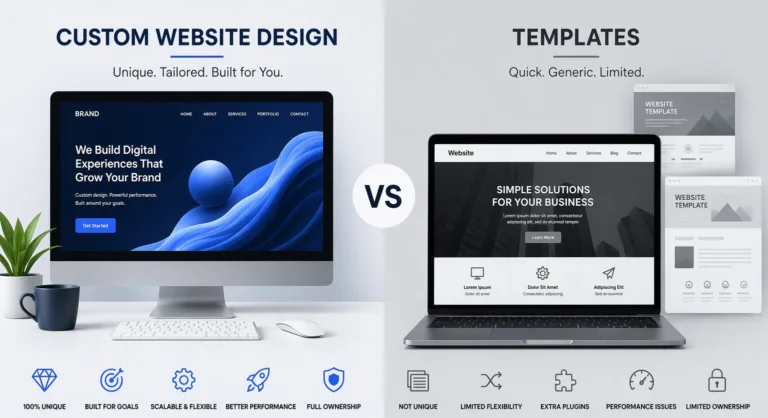
If the main goal is enquiry generation, the CMS should support strong service pages, landing pages, local SEO, contact forms, tracking, testimonials and clear calls to action. The website should make it easy for visitors to understand the service, compare value and contact the business. For companies planning a more strategic redesign, working with a local design partner such as Website Design Auckland can help align CMS selection with content structure, conversion goals and future marketing activity.
Ecommerce, bookings and payments.
If the website must take payments, manage inventory, accept bookings or connect with POS systems, the CMS must be evaluated as an operations platform. Shopify may be best for product sales, while Squarespace can be suitable for simpler service bookings and online payments. WordPress with WooCommerce can work well when the business needs ecommerce plus deep content flexibility. The right answer depends on transaction volume, payment options, shipping rules, product complexity and how much control the team needs over marketing pages.
Content marketing and long-term SEO.
If the business plans to grow through blog content, case studies, resources, suburb pages, industry guides or thought leadership, the CMS should make structured publishing easy. It should support categories, tags, internal linking, reusable content blocks, image optimisation and clean URL structures. Knapsack Creative’s examples of small business websites repeatedly emphasise clear messaging, trust building, calls to action, SEO opportunities and conversion-focused storytelling.
Those themes apply strongly to Auckland businesses that want their website to become a lead-generating asset rather than a static brochure.
Auckland-Specific CMS Considerations
Local context matters. Auckland businesses need websites that reflect local search behaviour, mobile usage, service-area targeting, trust signals and practical customer expectations. A CMS may look excellent in a demo but still fail if it cannot support local pages, fast updates, accessibility, mobile responsiveness or reliable support.
For Business Websites in New Zealand, the best CMS should support plain-language content, clear navigation, strong mobile layouts, contact details, service areas, reviews, case studies and measurable conversion paths. It should also be easy enough for the business to maintain after launch.
Local SEO and service-area structure.
Auckland companies often serve multiple suburbs or regions, but they should avoid thin duplicated pages. The CMS should support unique local landing pages, structured headings, internal links, FAQs, schema where appropriate and fast page load times. A content plan should connect website pages with real customer search intent, not only broad keywords. Square’s setup guide includes SEO, content planning, promotion and metrics as practical website steps, which reinforces the need to select a CMS that makes ongoing optimisation manageable.
Accessibility, security and trust.
Trust is especially important for service providers, health and wellness businesses, professional firms and ecommerce brands. The CMS should support SSL, backups, secure forms, spam protection, user permissions and regular updates. It should also make accessibility easier through semantic headings, alt text, keyboard-friendly navigation and readable layouts. Accessibility is not only a compliance topic; it improves customer experience and supports more inclusive digital communication across Auckland’s diverse audience.
Final CMS Selection Checklist for Business Websites
Before selecting a CMS, Auckland businesses should document what the website must do in its first year and what it may need to do in three years. This approach avoids underbuilding and overcomplicating at the same time. A simple brochure website may not need enterprise architecture, but a growing company should avoid a platform that blocks content, SEO or integration needs.
Use the following checklist as a practical decision tool for Business Websites. If a platform cannot satisfy the most important items without awkward workarounds, it may not be the right long-term choice.
Selection area
Questions to ask before choosing a CMS
Content management
Can staff edit pages, publish posts, manage images and update calls to action easily?
SEO
Can the CMS manage metadata, headings, URL slugs, redirects, sitemaps, structured data and internal links?
Performance
Does it support fast loading, mobile responsive layouts and reliable hosting?
Security
Are updates, backups, SSL, user permissions and form protection straightforward?
Integrations
Can it connect with CRM, email marketing, POS, ecommerce, analytics and booking tools?
Scalability
Will it still work if the business adds new services, locations, products or content types?
Ownership
Does the business understand ongoing costs, support requirements and platform limitations?
User experience
Does it support clear navigation, accessibility, trust signals and conversion-focused design?
A strong CMS selection is ultimately a balance of usability, flexibility, security, SEO capability and commercial fit. WordPress may be the best option for content depth and SEO flexibility. Webflow may suit design-led brands. Shopify may be the right foundation for ecommerce. Squarespace, Wix or HubSpot may be practical for simpler operating models. More advanced or headless CMS options may be suitable for larger organisations with complex governance needs.
For Auckland businesses, the smartest choice is the CMS that helps the team publish confidently, improve visibility, convert visitors and keep the website aligned with business growth. When Business Websites are planned around customer experience and operational needs, the CMS becomes more than software. It becomes a reliable foundation for digital marketing, sales and long-term brand trust.


 Landing Pages