 Areesh Ishtiaq
Making a beautiful website is only the first step. Without proper on-site SEO, even the most stunning designs remain invisible to potential customers searching online. On-page SEO, also known as on-site SEO, is the term for all the ways you improve your website’s search engine rankings for Auckland and user experience directly on the site.
On-site SEO is the base of your digital marketing plan. You have full control over your on-page elements, even though off-page factors like backlinks are important. This is one of the cheapest ways to improve your search visibility and get more organic traffic.
The numbers don’t lie: businesses that spend money on SEO get back an average of $2.75 for every dollar they spend. More importantly, 68% of online activities start with a search engine, so it’s important to optimize your site’s SEO for Auckland so that your target audience can find it.
Let’s look at the most important parts that can turn your website from a digital brochure into a powerful tool for getting leads.
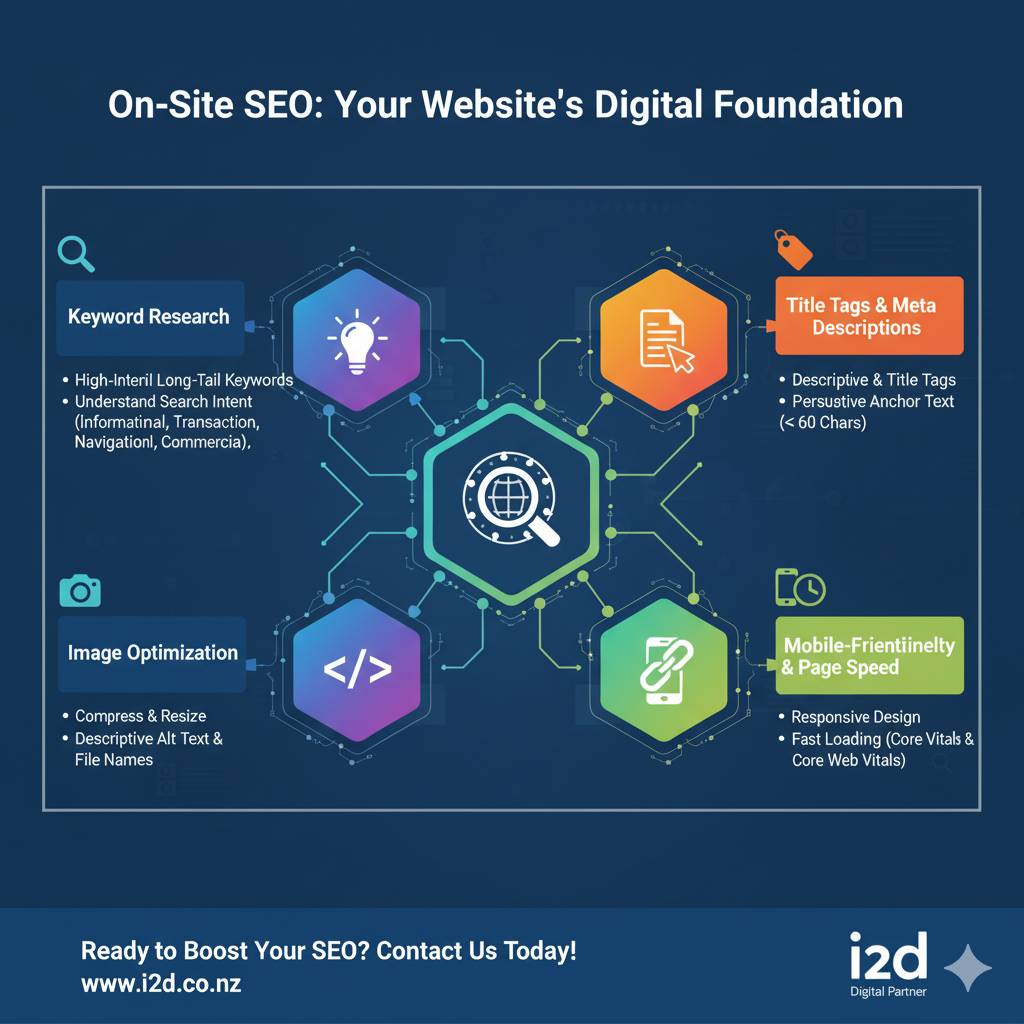
Keyword Research: The Blueprint for Success
Effective on-site The first step in SEO is to figure out what your audience is looking for. Keyword research shows you the exact words that people use when they search for your goods or services.
Finding the Right Words
Begin by coming up with ideas for topics that are important to your business. Then, use tools like Google Keyword Planner or examine the “People also ask” section in search results to discover related terms. Long-tail keywords are those that have a good balance of search volume and competition.
Instead of going after the very competitive “marketing,” try “digital marketing strategies for small businesses” instead. These specific phrases usually have less competition and bring in more qualified visitors.
Understanding Search Intent
Not all keywords are the same. There are four types of search intent:
- Informational: People who want to know more (“what is SEO”)
- Users looking for certain websites, like “Facebook login,” are navigational.
- Transactional: Users ready to purchase (“buy running shoes online”)
- Commercial investigation: Users looking for the “best CRM software 2025”
For better engagement and conversions, make sure your content matches the right intent.
Your Digital Storefront: Title Tags and Meta Descriptions
When someone searches for something, title tags and meta descriptions are the first things they see on your website. They have a direct effect on whether or not people click through to your site.
Crafting Compelling Title Tags
To avoid truncation in search results, keep title tags under 60 characters. Put your main keyword in a natural way, preferably near the start. The title of each page should be different and accurately describe what the page is about.
Strong title tag example: “Complete On-Site SEO Guide: 8 Proven Strategies That Work”
Writing Meta Descriptions That Are Persuasive
Meta descriptions don’t directly impact rankings, but they significantly affect click-through rates. Include your target keyword and a clear benefit or call to action in your descriptions that are less than 155 characters long.
“Master on-site SEO with our complete guide” is an example of a good meta description. Learn 8 proven techniques to boost your search rankings and drive more traffic.”
Header Tags: Creating Content Hierarchy
Header tags like H1, H2, H3, and so on help search engines understand how your page is set up and organize your content. They also make it easier for people to read your content when they scan it.
Best Practices for Header Tags
You should only use one H1 tag on each page. This tag should have your main keyword and make it clear what the page is about. Use H2 tags for the main parts and H3 tags for the smaller parts. This makes the content flow in a way that makes sense to both users and search engines.
Proper header structure also improves accessibility for users with screen readers, demonstrating Google’s emphasis on inclusive web design.
Internal Linking: Building Your Website’s Authority
Internal links connect your pages and distribute authority throughout your site. They help search engines find new content and figure out how pages are related to each other.
Strategic Linking Inside
Use descriptive anchor text that includes keywords to link to pages that are related. For instance, instead of “click here,” use “learn more about keyword research techniques.” This method gives both users and search engines a sense of the big picture.
Linking related content together will help you make topic clusters. If you have a comprehensive guide about digital marketing, link to specific articles about social media marketing, email campaigns, and content creation.
Benefits of Having Strong Internal Links
Internal linking that is well thought out lowers bounce rates by getting people to look at more of your content. It also helps you become an expert in certain areas by showing search engines how much you know about them.
Image Optimization: Visual Content That Performs
Images enhance user experience but can slow down your site if not properly optimized. Search engines can’t “see” images the way humans do, so optimization helps them understand visual content.
Improving the quality of technical images
Compressing images will make the files smaller without losing quality. Instead of “IMG_001.jpg,” use descriptive file names that include relevant keywords, like “on-site-seo-checklist.jpg.”
Add alt text to every image, describing what the image shows while naturally incorporating keywords when relevant. Alt text also makes things easier for people who can’t see.
How to Pick the Right Image Format
For photographs, use JPEG, while for graphics with transparency, use PNG. For better compression and faster loading times, think about using newer formats like WebP.

Mobile-Friendliness: Making the Most of the Most
More than half of all web traffic comes from mobile devices, so SEO success depends on optimizing for mobile. Google uses mobile-first indexing, which means it looks at the mobile version of your site first.
Key Mobile Optimization Elements
Use responsive design that changes based on the size of the screen. Ensure text is readable without zooming and buttons are easily tappable. To find and fix problems that only happen on mobile devices, test your site on a variety of devices on a regular basis.
On mobile devices with slower connections, the speed at which a page loads becomes even more important. Optimize images, minimize code, and consider implementing Accelerated Mobile Pages (AMP) for news or blog content.
Page Speed: The Need for Speed
The speed at which a page loads has a direct effect on both the user experience and search rankings. People expect pages to load in three seconds or less. If they take longer, people will leave and you will lose sales.
Ways to Make Things Go Faster
Compress and optimize images, minimize HTTP requests, and enable browser caching. If you want to serve content from servers that are closer to your users, think about using a Content Delivery Network (CDN).
Take out any plugins and scripts that aren’t needed and make your site slower. Use tools like Google PageSpeed Insights to regularly check how well your site is doing and find specific ways to make it better.
Core Web Vitals
Google’s Core Web Vitals check how fast pages load, how interactive they are, and how stable they look. These metrics have a direct effect on rankings, so it’s more important than ever to make your site load faster.
User Experience: The Link Between SEO and Success
SEO today goes beyond just keywords and technical improvements. When determining rankings, search engines increasingly take into account signals related to user experience.
Creating User-Focused Content
Use clear headings, short paragraphs, and bullet points to make it easy to scan your content. To keep visitors from being overwhelmed by big blocks of text, use white space well.
Implement clear navigation that helps users find information quickly. Make sure your contact information is easy to find and add a search function to sites with a lot of content.
How to Measure User Engagement
Monitor metrics like bounce rate, time on page, and pages per session to understand how users interact with your content. High engagement signals mean that the content is useful and meets the needs of the searcher.
Transform Your Website’s Performance Today
SEO on your site isn’t something you do once; it’s something you have to keep doing and improving all the time. The methods listed above work together to make a complete plan that makes both search results more visible and the user experience better.
Success comes from implementing these strategies systematically while monitoring performance and making data-driven improvements. Keep in mind that SEO is a long-term investment that pays off over time. Well-optimized sites will keep getting organic traffic for years.
Are you ready to unlock the full potential of your website? The i2d team is an expert at making SEO plans for Auckland that really work. Our expert guidance can help you implement these on-site optimization techniques effectively, ensuring your website attracts and converts more qualified visitors.

 10 min read |
  January 3, 2026